Floorplan: a Claude Code and Codex plugin that maps your codebase in plain English
Floorplan is a free Claude Code and Codex plugin that draws an interactive, plain-English map of your codebase, links frontend requests to server endpoints, and flags common security mistakes in AI-built apps.
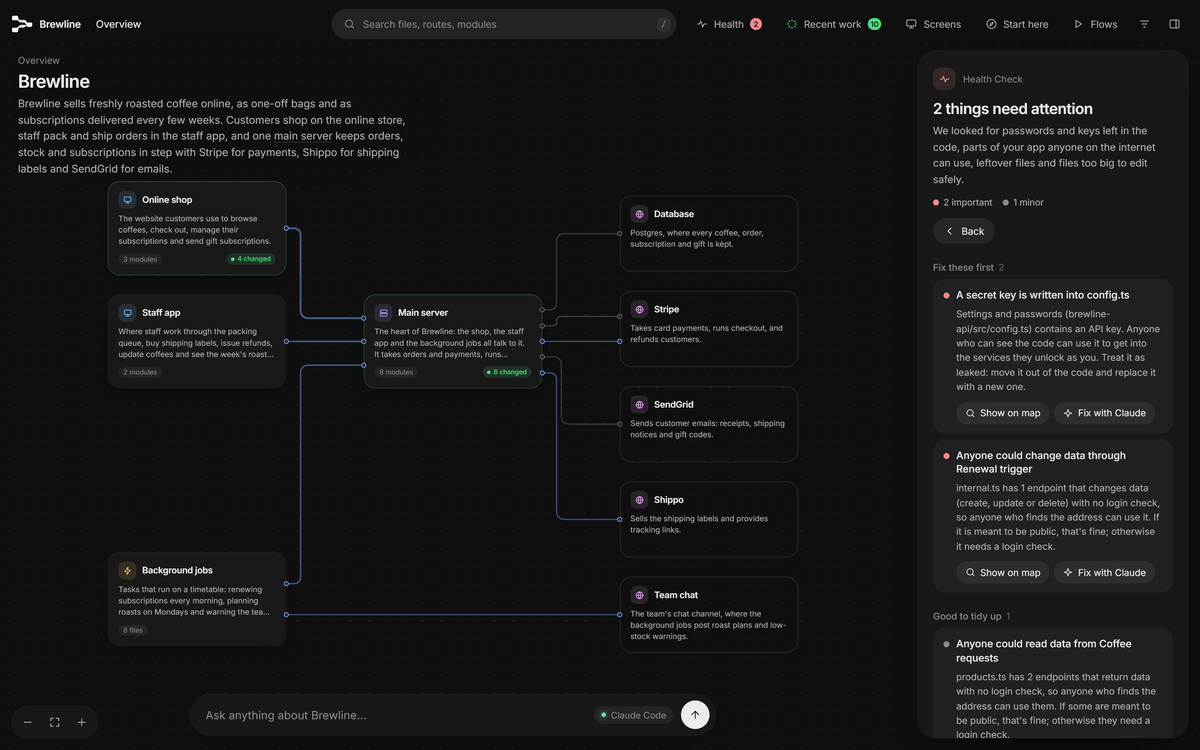
haydenschmitty/floorplan is a plugin for Claude Code and OpenAI's Codex that turns a codebase into an interactive map in your browser. Each part, file and web endpoint gets a plain-English name and a one-line description, and the lines between cards show which code imports what and which frontend request reaches which server endpoint, even across separate repos. On top of the map it adds a Health check for common mistakes in AI-built apps, a Recent work view of what your AI just changed, and an Ask bar that answers questions about your own code.
The repository was created on 27 October 2026 and had about 4,450 GitHub stars and 370 forks when we checked on 15 November 2026. It has shipped 23 releases in under three weeks, from 0.1.0 to 0.9.0. It is aimed at people who built an app with heavy AI help and can't say what happens when a customer checks out.
Quick facts
- What it is: a skill plus small Node scripts, packaged as a Claude Code plugin and a Codex plugin. Scripts do the mechanical work; Claude or Codex writes the names and descriptions.
- Requirements: Node.js 18 or newer, and either Claude Code or Codex (signed in with ChatGPT). No API keys; it runs on the plan you already pay for.
- Platforms: the tests run on Linux and Windows with Node 18, 20 and 22 on every push, and on macOS weekly.
- Dependencies: none. package.json exists only so npm test has a home. The bundled layout engine is elkjs 0.9.3 (EPL-2.0), with Inter and JetBrains Mono fonts.
- Licence: MIT. Price: free. Version at the time of writing: 0.9.0 (15 November 2026).
- Languages it scans: TypeScript, JavaScript, Python, Go, Rust, Java, Kotlin, Scala and Groovy, plus Vue, Svelte and Astro files. Endpoints are found in Express, FastAPI, Next.js, Django, Spring and about a dozen other frameworks.
How to install
There is one release channel; every GitHub release so far is a normal (non-prerelease) version. In Claude Code, run these two commands once in any terminal, then start a new session:
claude plugin marketplace add haydenschmitty/floorplan
claude plugin install floorplan@floorplan
In Codex you can add the marketplace from the app (Plugins, Add a marketplace, source haydenschmitty/floorplan, then install Floorplan), or from a terminal:
codex plugin marketplace add haydenschmitty/floorplan
codex plugin add floorplan@floorplan
First setup
Open your project (for a frontend and backend in separate repos, open the folder that holds both) and ask: "Make me a floorplan of this app." A scan lists files, imports, endpoints and requests in seconds without using tokens; then the AI reads your READMEs and entry points, decides the main parts and writes a description for every file and endpoint. You may be asked to allow Floorplan's node scripts; Codex also asks to run the map's server outside its sandbox.
No extra account is needed, but the Ask bar on the map works best with the Claude Code CLI installed so it can read your real code. Without it, questions can go through the Claude app, which answers from the map only. Codex's app already includes what the Ask bar needs. Later, "Update the floorplan" re-reads only what changed.
What stands out
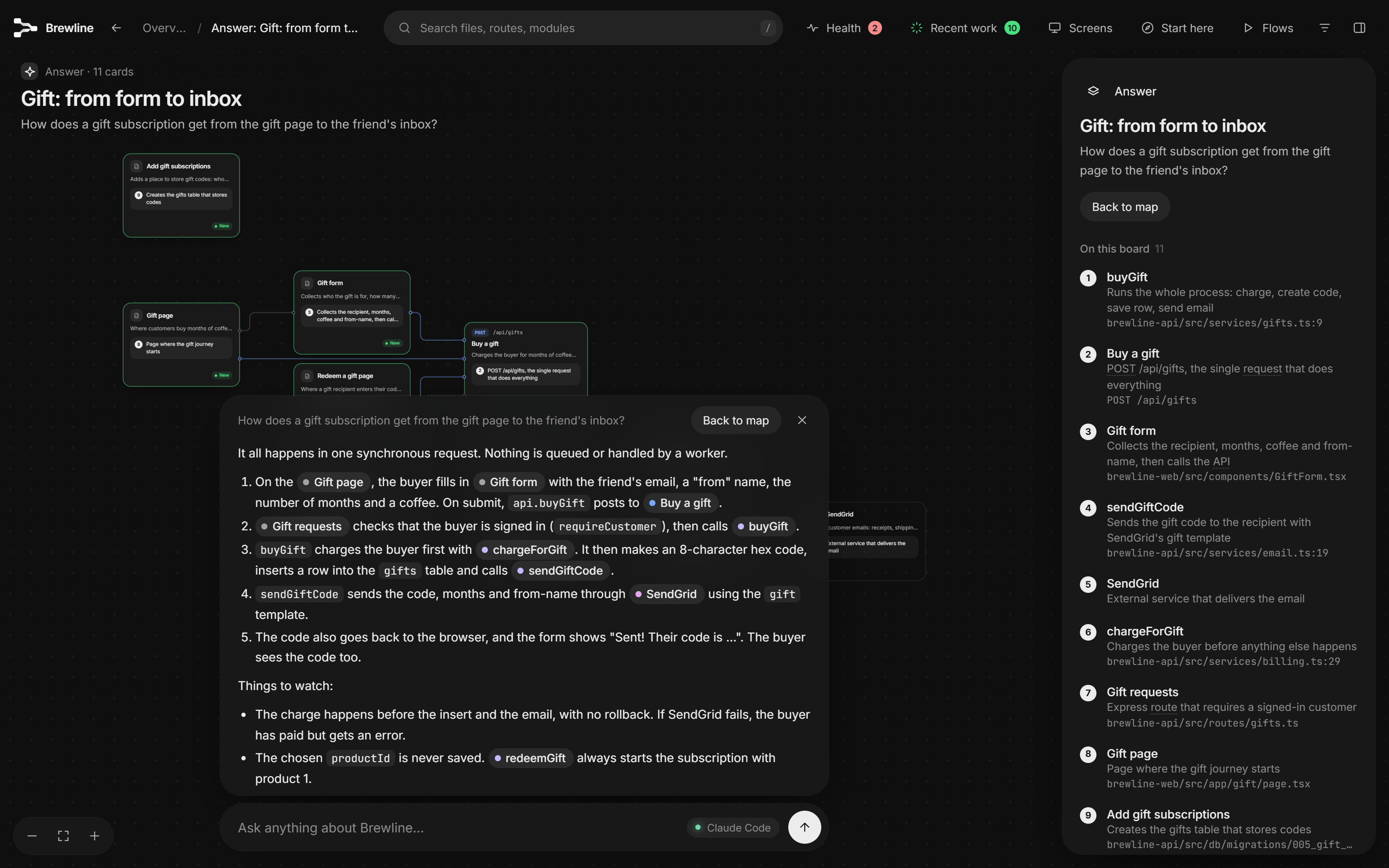
It joins frontend requests to server endpoints. Floorplan matches fetch, axios and requests calls to the routes that answer them, resolves router prefixes and mounted sub-routers, and learns a client's base path when the base URL lives in settings. The docs are frank that this is pattern matching rather than a compiler, so it catches most connections but not all; you can ask for a missing link to be recorded in architecture.json.
Plain English is the default audience. Cards say what a part does for the business, and the build warns when a part's name or summary slips into developer jargon. A switch changes it to a developer view.
The Health check targets AI-built-app mistakes specifically: keys written into code or sent to the browser, Supabase tables without row-level security, open Firebase rules, Stripe webhooks that anyone could fake, and endpoints with no login check. It records where a secret is and a masked hint, never the value. Much of the 0.9.0 release notes is about fewer false alarms, such as recognising Flask @login_required, FastAPI HTTP middleware and publishable pk_ keys, which tells you the check was noisy on some stacks before. Since 0.9.0 the panel also lists what it actually checked, so a clean result is not mistaken for "nothing to read".
Recent work closes the loop with your AI. After each make or update, the cards that changed light up green with a note on why.
Supply-chain caution is designed in. The plugin has no hooks, no MCP servers, no dependencies and no install scripts, and a test fails if a change adds any of them or uses eval. Since 0.4.2, each release includes CHECKSUMS.txt so you can verify your installed copy against the tag.
We tried it
We ran the parts that need no AI account in a Linux sandbox on 15 November 2026 (Node 24). The full test suite (node --test, nothing to install) passed: 370 of 372 tests, 2 skipped, 0 failed, in about two minutes. We copied two of the repo's test fixtures, made each a git repo, and scanned them with scan.mjs --json --unattended: a small Express app gave 5 routes and 5 import links, a FastAPI app 9 routes and 11 import links, each in under 0.2 seconds.
We then wrote a minimal architecture.json by hand and ran build.mjs. In 0.3 seconds it wrote a 2.1 MB self-contained index.html and a Health result: one medium finding saying none of the endpoints check who is calling, correct for a fixture with no login. It also reported every file and endpoint as undescribed; that writing is the AI's job, which is the part we did not test, since it needs a signed-in Claude Code or Codex. Two gotchas: scan.mjs --help runs a scan instead of printing help, and in --unattended mode the scan stops on a folder that is not a git repo (a plain folder is otherwise scanned as loose files).
How it was built with Claude
The evidence here is thin, and it points at contributors rather than the maintainer. Of 182 commits on main (27 October to 15 November 2026), 152 are by Hayden Smith and carry no Co-Authored-By trailer. Eight commits, all from outside contributors, credit Claude: five name Claude Opus 5.5 and three Claude Sonnet 5.5. They are targeted fixes, for example Fastify route prefixes and a Windows fix. The repo has no CLAUDE.md or AGENTS.md.
Copy-paste prompt: a plain-English map of your own app
Try it with your AI. Give this to Claude Code or Codex in your project folder after installing Floorplan. It makes the first map and walks you through the Health findings without changing code until you approve.
I installed the Floorplan plugin (haydenschmitty/floorplan). Before anything else,
check:
1. node --version is 18 or newer; if not, stop and tell me.
2. The plugin is installed (claude plugin list, or codex plugin list).
3. This folder is a git repo, or a folder that holds my repos [list them: e.g. web/ and
   api/].

If you just installed the plugin, tell me to start a new session first. Expect
permission prompts to run Floorplan's node scripts (and, in Codex, to run the map server
outside the sandbox); tell me what each one is before I approve.

Then: make me a floorplan of this app, written for [the owner / developers].

When the map is built:
- Summarise in five bullets how the app fits together: the main parts, the outside
  services, and how [a key user action, e.g. checkout] travels from screen to database.
- List every Health item marked important (high), with the file and why it matters, then
  list the medium ones separately. Do not print any secret values.
- Name any connection you think is missing between a screen and an endpoint.

Do not edit any code yet. For each Health fix you propose, show me the exact change and
wait for my confirmation before applying it. Do not touch .env files or credentials, do
not delete anything, and do not run git init, change git config (including
safe.directory), run migrations or deploy without asking me. After any approved change,
update the floorplan and show me what lit up under Recent work.
Known limits
- Your code goes to Anthropic or OpenAI. Floorplan's scripts send nothing, but the AI reads the files it needs to describe them, through your account, like any other task you give it.
- The Health check is "a check, not an audit", in the project's words. Its frequent fixes for false positives show it can misjudge both secrets and login checks on less common setups.
- Connections are found by pattern matching, so requests to an address that only exists in settings can be missed.
- Like any plugin, an update brings whatever the newest release contains; you can check the changelog and published checksums first.
- The map can show a card after two minutes asking whether you want an email when a hosted Floorplan Cloud launches. Nothing is sent unless you sign up; Not now brings it back in two weeks, and FLOORPLAN_NO_PROMPTS=1 turns the card off.
- In Codex, your Codex MCP servers still load when you ask questions, which can trigger "Prompt is too long"; the docs suggest disabling the ones you don't need.
Problems and feedback
Bugs and feature requests go to the GitHub issue tracker, with the details CONTRIBUTING.md asks a report to include; at our check there were 15 open issues and 33 open pull requests. The troubleshooting page covers common snags such as the CLI not being found or git's "dubious ownership" error in containers. Security problems should be reported privately as SECURITY.md describes, not in a public issue.
FAQ
Does Floorplan need an API key? No. It runs inside Claude Code or Codex on your existing plan. The Ask bar uses the Claude Code CLI or Codex signed in on your machine.
Does it change or commit my files? It writes only its own floorplan/ folder, which ignores itself in git, and in Claude Code an optional note in CLAUDE.local.md that goes into your clone's private ignore list. It never touches your code, .gitignore or CLAUDE.md.
Can it run in CI without Claude Code or Codex? Yes, with work. The scripts never call a model; an unattended mode, --json output and a workflow.json file let your own program run the steps and ask any model to write the three JSON files the map needs.
Can I map an app that isn't built yet? Yes. Share a PRD or spec and ask for a floorplan, and you get a blueprint with dashed cards and a review of open decisions instead of a Health check. Once the code exists, it can switch to mapping the real code.
How long does the first map take? A few minutes for a small app, longer for a big one because every file and endpoint gets described; the scan itself takes seconds and uses no tokens. Updates re-read only what changed.
Does my source code leave my computer? Only the way Claude Code or Codex always work: the AI reads files through your account. The map and its server are local. Publishing to the Claude app uploads names, descriptions and structure, not source, and asks first. Floorplan itself sends only a waitlist email if you sign up.
How do I update or uninstall it? Claude Code: claude plugin update floorplan@floorplan (or enable auto-update in /plugin > Marketplaces); remove with claude plugin uninstall floorplan@floorplan. Codex: codex plugin marketplace upgrade floorplan then codex plugin add floorplan@floorplan; remove with codex plugin remove and codex plugin marketplace remove. Then delete the floorplan/ folder.
Source: haydenschmitty/floorplan on GitHub, Floorplan releases, Floorplan changelog, Getting started, How it works, Is it safe to install?, Privacy and security, Running without an agent session, Troubleshooting, Floorplan in Codex, Floorplan commit history
This story first appeared in the claudefox daily briefing for November 15, 2026.