antialgorithm: a Claude Code skill that moves creative work past the first average pick
antialgorithm is a Claude Code skill that pushes creative work past the first, most average pick. It names the default, then ties the replacement choice to the reader's own project.
What is antialgorithm?
antialgorithm, in mankidev/antialgorithm, is a Claude Code skill that makes the model name its first, most average creative pick and then move away from it for a reason taken from the reader's own project.
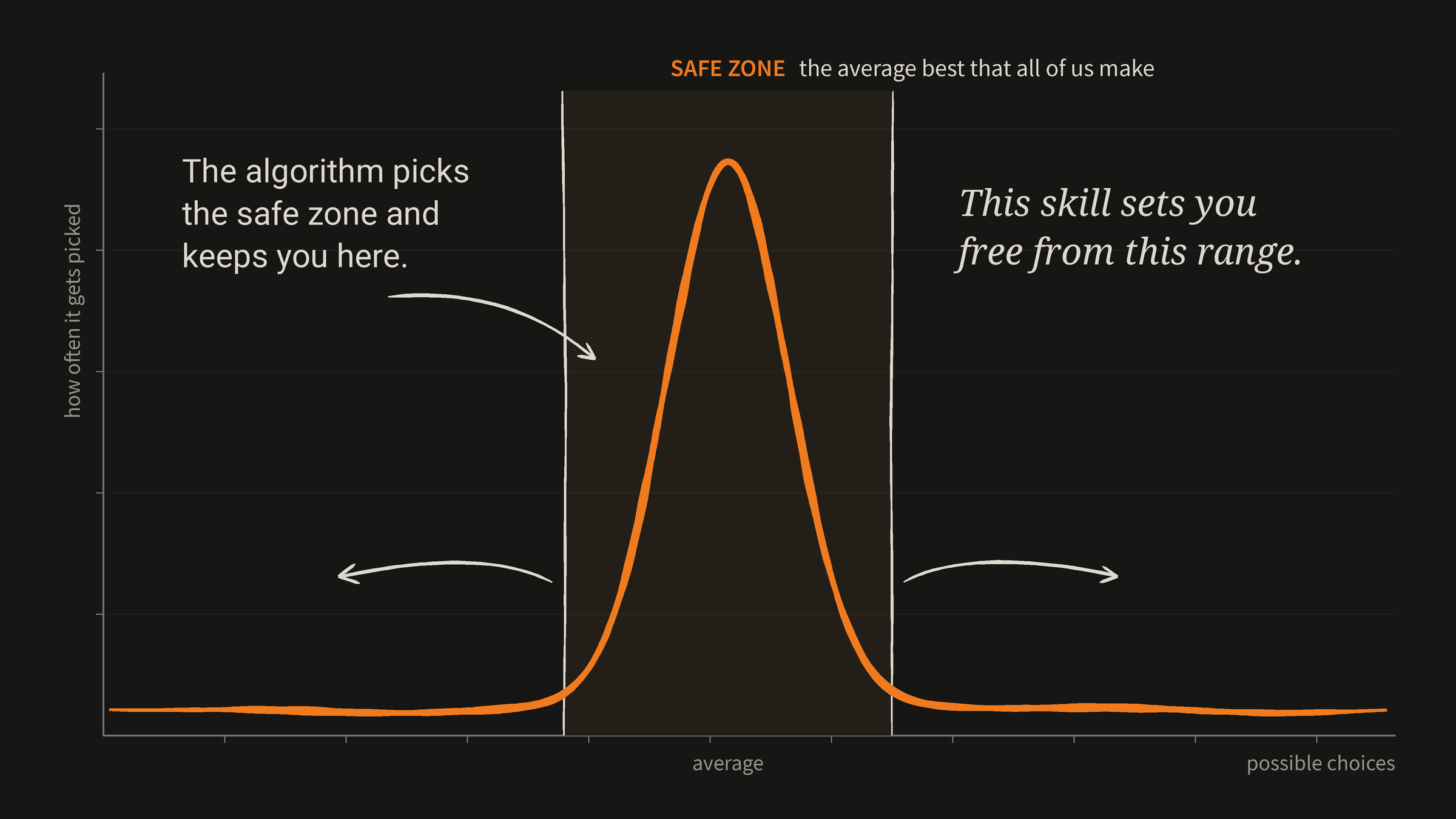
The skill treats the first answer as the average of what was already made, and treats its familiarity as the problem.
It covers creative work such as names, copy, story, game ideas, posters and UI, and it asks the model to tie each move away from the average to something specific in the project, its world, its constraints, its audience or its odd details.
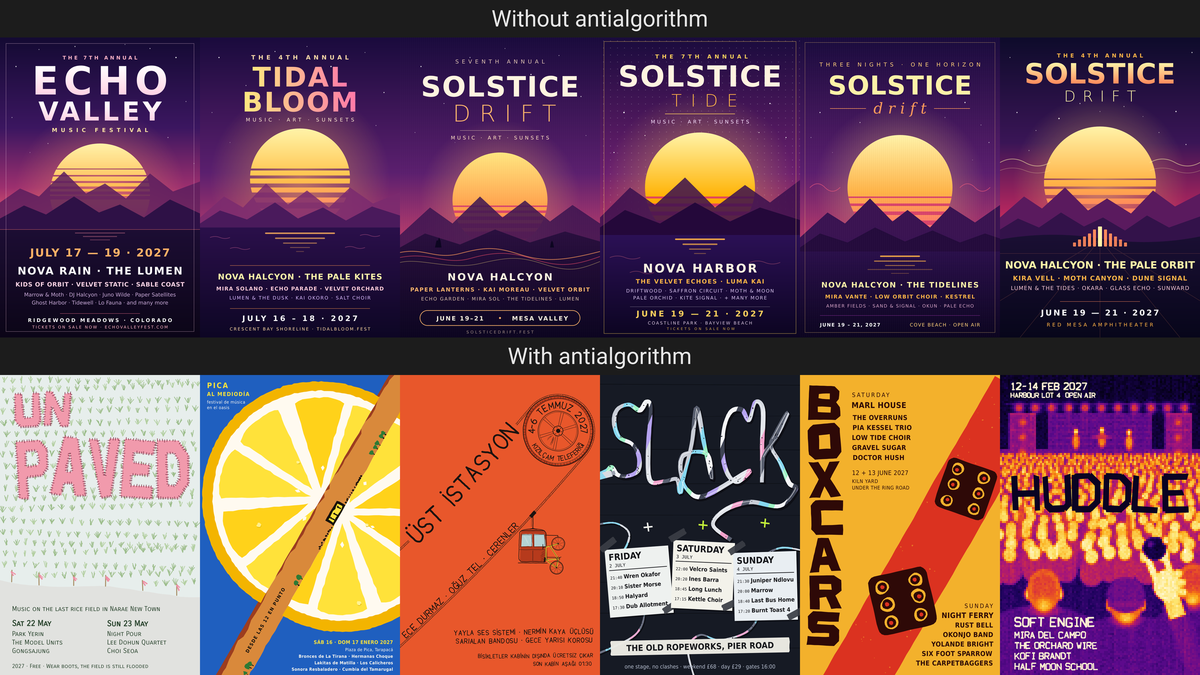
The README shows two rows of six posters made from the same poster prompt, with the top row from one batch of six runs without the skill and none left out, and the bottom row picked from about a dozen runs made while the skill was still being written.
The prompt in the README asked for a poster for a music festival as a 400x600 SVG, saved as final.svg in the current folder.
Who is antialgorithm for?
antialgorithm is for people using Claude Code who leave a creative choice open to the model, such as an idea, a name, a story, a visual style, a poster layout or a title.
The skill also applies when the reader says the result is too generic, boring, typical AI, too safe, cliche, average or seen it before, using the skill's own trigger words.
It is not for code identifiers, bug fixes or choices the user already made, and when the user asks for the plain, standard or expected version, the skill tells the model to give it.
The model is told to write the work in the language the user wrote in, unless the user's standing rules name another language for that kind of text, such as one fixed language for code, project names, game names or a store page.
Quick facts
- Platform: a Claude Code skill, installed into the Claude Code skills folder.
- Minimum versions: the scripts need Python 3.
- Extra needs for check.py: numpy, Pillow and rsvg-convert, or the cairosvg package.
- License and cost: MIT, and the license text grants permission free of charge.
- Language: Python, for the three scripts in the scripts folder.
- Latest release: none. No releases were listed as of November 18, 2026.
- GitHub stars: about 260 as of November 18, 2026.
What stands out
- Naming the default first. Before giving a creative answer, the model finds the obvious one, states it to itself in one line, and does not use it unless the context truly asks for it. Each choice then needs a reason that can be said in one sentence, taken from the project rather than from taste in general, and swapping a cliche for its well-known opposite does not count as moving away.
- Seeds for thin requests. When a request carries little context and the reader wants the work now or cannot answer, seed.py rolls a starting point. A visual seed gives a making method, colors, layout, type, a verb and a scale, a setting, a region and, half the time, an object. A text seed gives a voice, a way in and a register, and an idea seed gives a verb, a constraint, a scale and a pressure. The seeds draw from system randomness, so two people sending the same prompt start in different places.
- Text that cannot be pasted elsewhere. The skill says that if a sentence could be pasted into another project without changes, it must be rewritten until it could not, and it prefers a concrete detail over a general claim and a plain word over an impressive one. It also lists marks of default AI text to avoid, including an offer at the end to redo the text, mirrored pairs, and a last line that sums up or ties a bow on the text.
- Visual method marks and a roughening script. The skill takes the look from the subject, its material, place, time and mood, and replaces the smooth AI finish with marks left by the making method, such as uneven ink and broken edges for print and paint, or a pixel grid and scan lines for screens and machines. For hand-made methods, rough.py shakes straight lines, shapes and letters and breaks the even spacing of repeated marks, so a hand-made look drawn in code stops looking plotted.
- A check before showing. Before showing any SVG, the model runs check.py, which renders the image at full size and at icon size and lists text that runs off an edge, is covered by a shape, has low contrast or is too small. The skill then asks three questions: could the answer belong to a different project, is it what most people would make first, and can the choice be justified in one sentence from a fact about the project.
How do I install antialgorithm?
antialgorithm installs by cloning mankidev/antialgorithm into the Claude Code skills folder at the path in the command below.
From the project's README at https://github.com/mankidev/antialgorithm/blob/main/README.md, run this command.
git clone https://github.com/mankidev/antialgorithm ~/.claude/skills/antialgorithmThe scripts need Python 3, and check.py also needs numpy, Pillow and rsvg-convert, or the cairosvg package.
The cloned folder contains SKILL.md and a scripts folder with seed.py, rough.py and check.py.
How it was built with Claude
Some commit messages in the repository history carry a Co-Authored-By line naming Claude, including lines naming Claude Opus 5.5 and Claude Haiku 5.5.
Those messages describe fixes to check.py on Windows and a fix that quotes the SKILL.md description so the YAML parses.
Try it with your AI. Paste this into your AI assistant after installing the skill, and replace the bracketed parts with your own details.
Use the antialgorithm skill in Claude Code for this creative brief: [describe your
project, its audience and the creative choice you need, such as a name, a poster or a
page layout]. First name the default pick for this brief in one line, then move away
from it for a reason taken from my project, not from taste in general. If my brief is
thin, use scripts/seed.py with the visual, text or idea kind from SKILL.md as the
starting point, and tie the seed to the subject with a reason. For an SVG made by a
hand-made method, use scripts/rough.py, and before showing any SVG, use scripts/check.py
and fix every problem it lists. Keep the length and format I set, write in [language],
and do not invent facts about my project. Use only the official commands and interfaces
named in the README. Show risky steps first and wait for me to confirm them. Do not
install anything from unknown sources, do not touch credential files, and do not delete
anything.
What are antialgorithm's limits?
antialgorithm does not cover code identifiers, bug fixes or choices the user has already made, and it does not override a request for the plain, standard or expected version.
The method marks for posters, covers and promo images do not apply to interfaces, where buttons, menus, panels and game HUD keep a clean grid, exact alignment and centered labels, and they do not apply in the same way to pixel art and block models when another skill or tool owns how they are drawn, where the skill is used only to choose the subject, palette and composition.
rough.py is only for hand-made methods such as print, paint, stamps and ink, and screen, camera and render looks keep their own marks, while a hand-drawn wobble on an LED board, an x-ray or a 3D render is treated as a second default laid over the first.
check.py does not see letters drawn as paths or text that spills out of its own box, so those must be checked by eye, and for formats other than SVG the same checks must be done by eye after rendering the image.
The skill tells the model to keep an SVG under about 200 KB, and it keeps the parts the work needs in order to work, such as information someone must read, a thing someone must press, a shape someone must recognize or a detail someone must find, whole, clear and in place, never cut by an edge, covered, broken by texture or lost in the style.
The model must not invent facts to make a text concrete, and must use real details from the user or the project, ask for them, or keep the detail clearly made up, adding one short sentence saying so only when a made-up fact could pass for a real one and do harm, such as a price, a weight, an ingredient or a claim about the product.
The README and SKILL.md state no security or privacy guidance, and LICENSE states that the software is provided as is, without warranty of any kind.
Related on claudefox
- homelab-diagram: a Claude-written script that draws your homelab network from a YAML file
- teardown: a Claude Code skill that builds take-apart 3D machine simulators as one offline HTML page
- ex-USSR Kinship Research: an evidence-first genealogy skill for Claude Code and Codex
- CleanYourTV: debloat an Android TV or Google TV over Wi-Fi with Claude Code and get an Apple TV-style home screen
Problems and feedback
Report problems and feedback on the Issues page for mankidev/antialgorithm at https://github.com/mankidev/antialgorithm/issues.
Source: antialgorithm repository, README.md, SKILL.md, LICENSE, scripts/seed.py, scripts/rough.py, scripts/check.py, Issues, Releases, Commit fixing check.py on Windows, Commit finding a cairo DLL for check.py on Windows, Commit quoting the SKILL.md description
This story first appeared in the claudefox daily briefing for November 18, 2026.