homelab-diagram: a Claude-written script that draws your homelab network from a YAML file
homelab-diagram (Goblinmine/homelab-diagram) is an MIT Python script, written with Claude Code, that renders an r/homelab-style SVG/PNG network diagram from a YAML inventory. The layout is hand-placed for one lab, so expect to edit it.

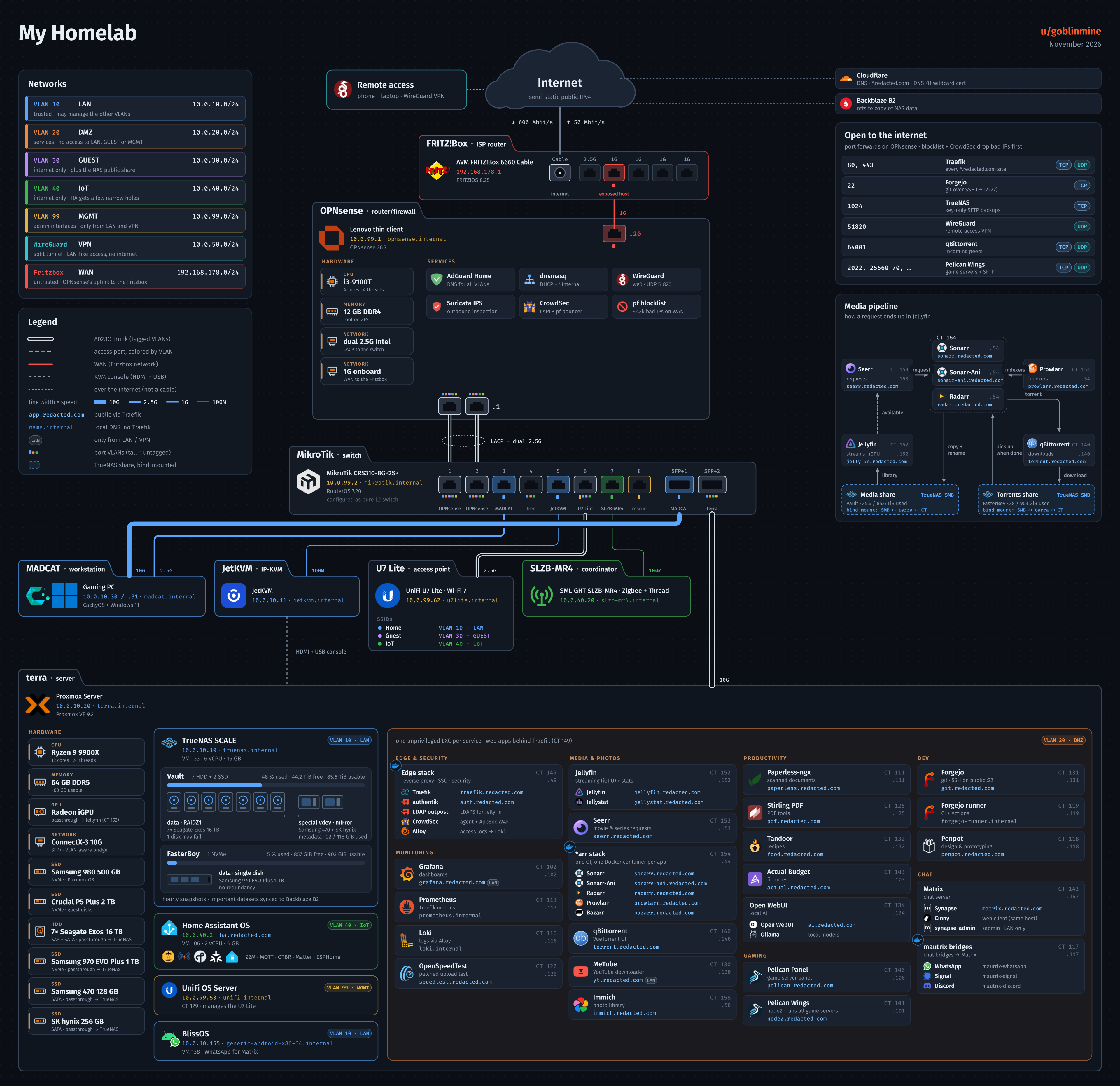
homelab-diagram (GitHub: Goblinmine/homelab-diagram) is a small MIT-licensed Python project that turns a YAML file describing a home network into one large SVG and PNG diagram, in the style people post on the r/homelab subreddit. Its author says up front that Claude wrote the code in Claude Code, from the author's descriptions and feedback on every render. The repository was created on November 7, 2026 and had 1,114 stars and 92 forks when we checked on November 16, about 124 stars a day.
The README warns that this is not a general tool and calls it a starting point, not a finished product. The content comes from inventory.yaml, but the position of every box, port and cable is hand-placed in build.py for the author's own network. It does not scan or discover anything: you type your devices, VLANs and cables into the YAML yourself, and move coordinates in the code where your lab differs.
Quick facts
- What it is: two Python scripts. build.py draws the diagram, and fetch_icons.py downloads service icons. No package, releases or tags; you run main.
- Requirements: Python 3.11+ with PyYAML, rsvg-convert from librsvg for the PNG, and the Fira Sans and Fira Code fonts. Pillow is optional with plain Python (label widths are then estimated) and installed by default with uv.
- Output: out/homelab.svg and out/homelab.png (rendered at 1.6x), plus an -unredacted pair on request.
- Licence: MIT for the code and the glyph icons in icons/. Service logos come from homarr-labs/dashboard-icons and are not in the repo; the Fira fonts (SIL Open Font License) are not included.
- Cost: free and local; cloning and the icon download need network access.
How to install
With uv, as the README shows:
git clone https://github.com/Goblinmine/homelab-diagram
cd homelab-diagram
uv sync                         # once: create .venv, install PyYAML + Pillow
uv run fetch_icons.py           # download the service icons into icons/ (once)
uv run build.py                 # -> out/homelab.svg + out/homelab.png (redacted)
uv run build.py --unredacted    # -> out/homelab-unredacted.svg + .png
Without uv, install PyYAML, then run python3 fetch_icons.py and python3 build.py; without Pillow, label widths are estimated. Either way librsvg and the Fira fonts come from your system. The README gives a full package list only for Arch; the Debian/Ubuntu line leaves Fira Sans to you, the macOS cask names apply only if your Homebrew has them, and Windows is not covered. CLAUDE.md warns that without the fonts every width calculation is off. Without rsvg-convert, build.py writes the SVG and stops at the PNG step.
First diagram: walking through the YAML
Our suggestion: render the bundled inventory.yaml unchanged first; the author says a fresh clone renders exactly the posted image. The file reads in this order:
- meta and redact: title, a redacted title, date, watermark and domain (example.com in the bundled file; your real one in your copy). By default the domain becomes redacted.com and SSIDs use their generic redacted: names; both switches and the placeholder are editable.
- vlans: ID, name, subnet, colour and a short policy note per VLAN.
- internet: line speed and cloud services (Cloudflare and Backblaze B2 in the example).
- fritzbox, opnsense, switch: ISP router to firewall to switch. Each port lists what it connects to and its untagged and/or tagged VLANs.
- devices and ssids: device cards under the switch, with the SSID list inside the access-point card.
- remote: the WireGuard remote-access card.
- port_forwards: the only ports drawn, in an "Open to the internet" card.
- terra: the server card with hardware tiles, DMZ containers, TrueNAS pools and a media-pipeline panel.
To make it yours: edit inventory.yaml, render, then move coordinates in build.py where things do not fit. Since November 14, build.py --inventory other.yaml reads another inventory, but still writes out/homelab.svg and out/homelab.png. New service icons go into ICON_MAP in fetch_icons.py first (dark logos need a -light variant or a RECOLOR entry); a missing icon makes build.py exit with a hint to run fetch_icons.py.
What stands out
- Line width shows link speed: access cables are 9.5, 3.8, 2.4 and 1.4 SVG units wide for 10G, 2.5G, 1G and 100M, and trunks add 3.4. Trunks are white with a dark core; access links take the VLAN colour.
- Redaction is the default. The normal render is the shareable one; --unredacted is the private one.
- It stops with an assert message instead of drawing an overflowing column, pool box or switch row; the pool check says how many pixels it needs.
- Opinionated rules: only physical cables are solid lines, card borders take the device's VLAN colour (trunk devices get a neutral border), and internal-only ports are left out.
- One contributor pull request has already generalised it: canvas height follows the content, any number of RJ45 ports, and optional fields for an unmanaged ONT (stub: true), VMs versus containers, cluster nodes, PPSK Wi-Fi and pool warning thresholds (default 85%). It says the example still renders a byte-identical SVG.
How it was built with Claude
The README describes the process. The author's network was already documented in an Obsidian vault, written by another Claude Code session. Claude Code read those notes, filled gaps with read-only checks on the live systems, wrote inventory.yaml and build.py, and checked the render and zoomed-in crops for overlaps before showing it. The author says about 60 rounds of feedback followed, then Claude made a cleaned-up copy for the public repo. The README names Claude Code with Claude Opus 5.5.
Main has four commits. Three carry a Co-Authored-By: Claude Opus 5.5 trailer: two by Goblinmine on November 7 and the squashed pull request #1 from gleep52. The fourth, a uv setup from 01Petard, has none. History starts at the cleaned-up publish, so the earlier feedback rounds are not in the repo.
For adapting the diagram to another lab, CLAUDE.md is the most useful file. It lists the hardcoded parts of build.py, an 11-topic interview asked three to six questions at a time, a render-and-check loop, and a firm rule: only read-only commands, and ask before touching any system. Reviewing pull request #1, the author reproduced a 30-pixel gap in a WAN line, spotted a KeyError for PPSK SSIDs in the code, and requested changes before merging.
Try it with your AI. This prompt uses the repo's CLAUDE.md to have your agent interview you and produce a redacted diagram. Fill in the bracketed fields first. It is deliberately stricter than CLAUDE.md (no commands on your devices, even read-only), so fact-gathering is slower. Read fetch_icons.py and build.py before they run, and keep your real domain and SSIDs out of shared AI chats.
I want an r/homelab-style network diagram of my lab using Goblinmine/homelab-diagram.

First check and report: python3 --version is 3.11+; uv --version works; rsvg-convert
--version works; fc-match "Fira Sans" and fc-match "Fira Code" return Fira fonts. On
macOS fc-match may be absent even with the fonts installed; then ask me to confirm. If
anything is missing, tell me what to install and stop. Do not install it yourself.

Then:
1. Clone https://github.com/Goblinmine/homelab-diagram into [folder] and read CLAUDE.md
   and README.md.
2. Interview me in rounds of 3-6 questions, following CLAUDE.md. My notes: [path, or
   "none"].
3. Run no commands on my routers, switches or servers, not even read-only ones. Show me
   any useful command and I will paste the output.
4. Write my lab to my-lab.yaml, keeping the schema. Leave inventory.yaml as it is.
5. Add any new icons to ICON_MAP in fetch_icons.py as CLAUDE.md describes, and show me
   the change.
6. Run uv sync, uv run fetch_icons.py and uv run build.py --inventory my-lab.yaml (this
   overwrites out/homelab.svg and .png). Check out/homelab.png for overlaps before
   showing me.
7. Adjust coordinates in build.py where things don't fit; re-render after each change.
8. Before I share, grep out/homelab.svg for [my domain], my real SSID names and anything
   else private (IPs, hostnames, ports). Report every match; there should be no real
   domain or SSID names.

Do not delete files and do not touch any credentials.
Known limits
- Not a general tool: expect to edit Python coordinates for any lab unlike the author's (another switch, no separate firewall, several servers).
- rsvg-convert and the Fira fonts are system dependencies uv cannot provide. Without the fonts, label widths are wrong.
- Redaction swaps only the domain, SSID names and optionally the title; private IPs, hostnames, hardware and open ports are drawn as written. Review the image before posting.
- fetch_icons.py downloads third-party logos via jsDelivr, falling back to raw GitHub.
- It is young: no releases, version 0.1.0, nine days of history when we checked. Note a commit that works for you, since main can change.
Related on claudefox
- BAMA: Claude Code and Codex skills that plan, design and build native macOS apps
- CleanYourTV: debloat an Android TV or Google TV over Wi-Fi with Claude Code and get an Apple TV-style home screen
- IPVIO Stream: the Claude-built Android TV player, and the CLAUDE.md that keeps it shipping
- huashu-motion lets Claude Code or Codex make a product launch film with music that you edit by clicking a frame
Problems and feedback
Issues are enabled, and the author has reviewed and merged both pull requests so far. When we checked on November 16 there were no open issues or pull requests. For layout trouble, start with the assert messages and the hardcoded-sections table in CLAUDE.md.
FAQ
Does homelab-diagram scan my network automatically? No. Everything comes from inventory.yaml, which you write yourself, and the layout is hand-placed in build.py for the author's network.
Do I need uv? No. The README also shows plain python3 with PyYAML installed. uv installs PyYAML and Pillow from the pinned uv.lock; without Pillow, label widths are estimated.
What is redacted by default? The domain (to redacted.com), SSID names and optionally the title. IPs, hostnames, hardware and open ports stay, so grep the SVG before posting.
Does --inventory create a second output file? No. It reads another inventory but still writes out/homelab.svg and out/homelab.png.
Can I use CLAUDE.md with agents other than Claude Code? The README says other agents can use the same file as context.
Built by Goblinmine with Claude Code
Source: GitHub: Goblinmine/homelab-diagram, homelab-diagram README, homelab-diagram CLAUDE.md, homelab-diagram example inventory.yaml, homelab-diagram build.py, homelab-diagram pyproject.toml, homelab-diagram commit history, Pull request #1: optional inventory fields, Pull request #2: uv project setup
This story first appeared in the claudefox daily briefing for November 16, 2026.