Google Antigravity Orchestrator explained: how it works, who gets it and when to use it
Google Antigravity's Orchestrator pairs a Gemini 4 Carbon or Argon planner with Gemini 4 Hydrogen as the executor and hands control back to the planner when Hydrogen hits friction. Here is how it works, which plan gets it and when to use it.

On November 12, Google added a new option called Orchestrator to the model selector in Google Antigravity's app and CLI. It runs two models in one conversation: a larger Gemini 4 model plans and reviews, and the fast Gemini 4 Hydrogen writes the code. Google says this reaches near-Carbon task success with 24% less quota and 19% faster completion on average. Here is how the hand-off works, who gets it, when to use it, and how it compares with Claude Code.
What does Antigravity Orchestrator actually do?
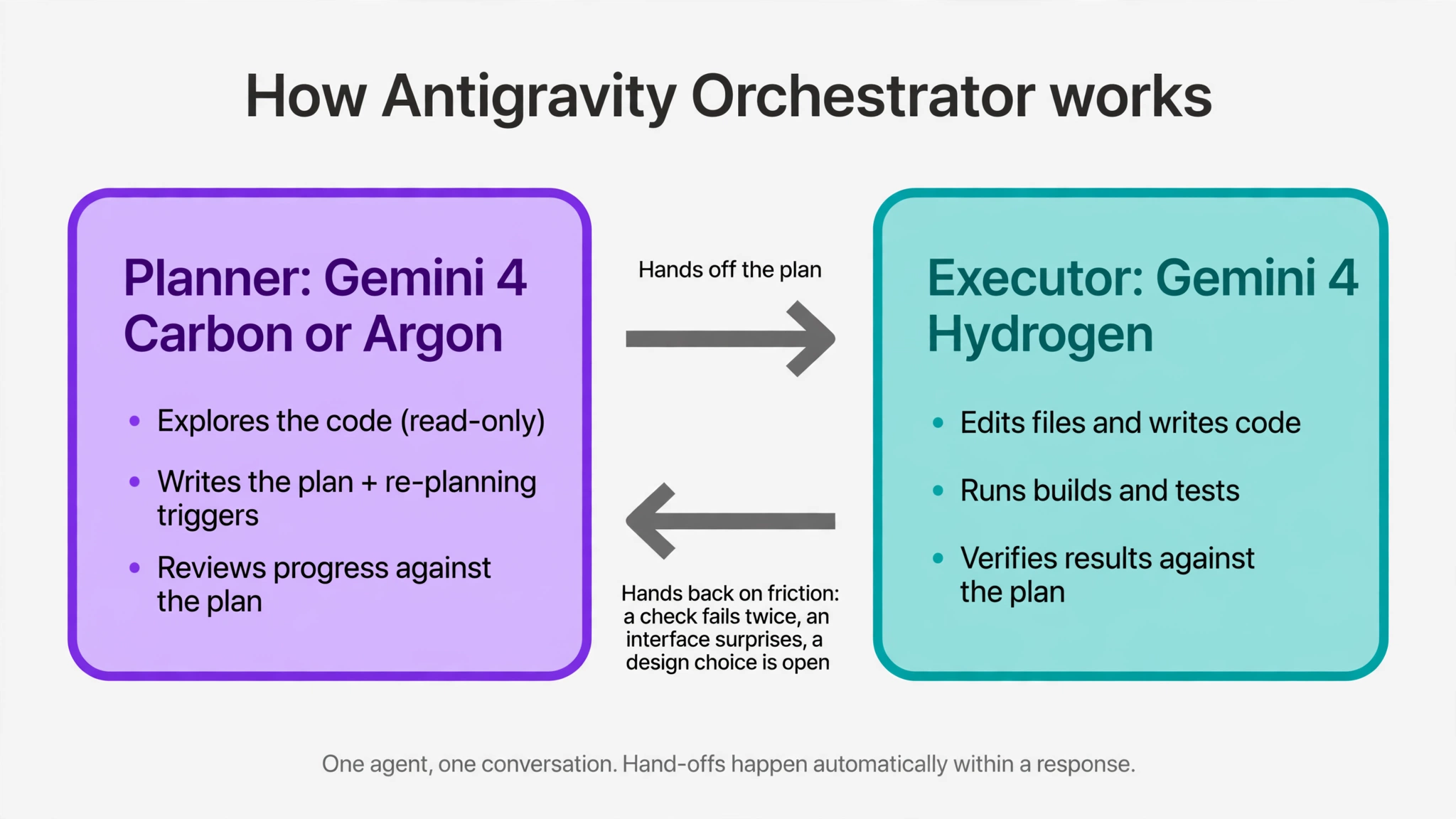
According to the Antigravity docs, every message you send starts with a read-only planning phase. The planner explores the codebase, resolves ambiguities and writes a concrete implementation plan, including the conditions that should trigger re-planning. Questions and reviews are answered by the planner directly.
Then Gemini 4 Hydrogen edits files, runs builds and tests, and checks results against the plan. The key part is the hand-back. If Hydrogen runs into friction, such as a verification step that fails twice, an interface that behaves differently than expected, or a design choice the plan didn't settle, control returns to the planner. The planner repairs the plan and hands execution back. On longer tasks, and when you message mid-work, the planner also reviews progress against the plan. It all happens inside one response.
Who can use Orchestrator (Carbon) and Orchestrator (Argon)?
There are two Orchestrator options. The one you pick sets the planner; the implementer is always Hydrogen. Availability per Antigravity's models page and pricing page on November 18:
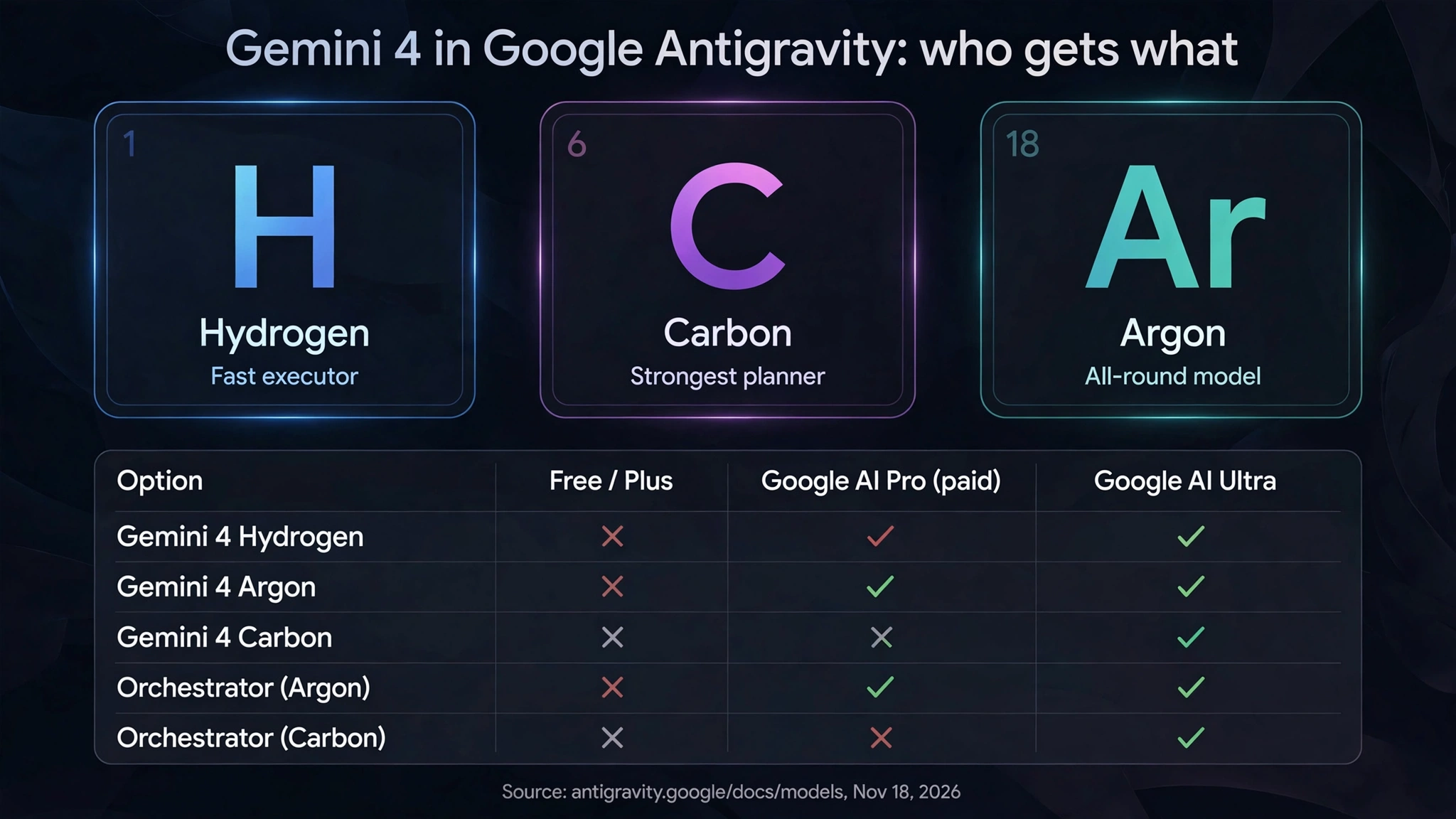
- Orchestrator (Carbon): Gemini 4 Carbon plans. Google AI Ultra is the only individual plan that gets it.
- Orchestrator (Argon): Gemini 4 Argon plans. Google AI Ultra, and Google AI Pro on paid plans or on trials with eligible premium devices.
- Free and Google AI Plus: no Orchestrator and no Gemini 4 models.
- Enterprise: the two Google sources disagree. The models table marks both Orchestrator options unavailable for Enterprise, while the launch blog says enterprises can access Hydrogen and Orchestrator in Gemini for business, without describing setup steps.
Inside Antigravity, Hydrogen on its own is listed for paid Pro (non-trial), Ultra and Enterprise. Google Workspace accounts don't include Antigravity plans or higher limits.
How do you turn Orchestrator on?
In the Antigravity App, pick Orchestrator (Carbon) or Orchestrator (Argon) in the model selector under the prompt box; it stays selected for the conversation. In the CLI, choose it with /model (persists across sessions) or pass the quoted name at launch or in headless mode:
agy --model "Orchestrator (Carbon)"
agy -p "Add input validation to the signup form and run the tests." --model "Orchestrator (Argon)"
agy models   # list the model identifiers your account can use
Orchestrator has a fixed configuration: no thinking level, and /effort and --effort don't apply. Carbon and Argon offer Low, Medium and High; Hydrogen adds a fourth level, xhigh, shown as Extra in the app.
When should you pick Orchestrator instead of a single model?
Google's guidance on the models page:
- Orchestrator (Google's recommended default): features, bug fixes, refactoring, multi-file debugging.
- Carbon or Argon directly: when every step needs maximum reasoning, such as distributed-system design, subtle race conditions or multi-repository migrations.
- Hydrogen directly: quick tasks with no planning phase, such as package upgrades, boilerplate, unit tests, docs and small scripts.
- /swarm (preview on Pro and Ultra, and since November 17 on business and enterprise accounts where admins allow it): tasks that split cleanly across files or packages, run by parallel workers with a verifier on a shared message board. Swarms use quota much faster.
Orchestrator keeps a single agent; for parallel agents the docs point to subagents, Swarm, Boost or Teamwork. If you want to decide yourself which model handles which role, Google points to wiring Hydrogen and Carbon together with the Antigravity SDK. The trade-off is control: you don't choose when the switch happens or how hard either model thinks.
What do the 24% and 19% numbers mean?
Both Google posts give the same figures but disagree on the benchmark version. The Antigravity blog says Terminal-Bench 4.1. Google's main Hydrogen announcement on blog.google says Terminal-Bench 4.0 and links the 4.0 page, while using 4.1 for Hydrogen's standalone score of 57% against 18.2% for Gemini 3.8 Flash. Neither publishes absolute success rates, so treat near-Carbon as a vendor claim on one benchmark.
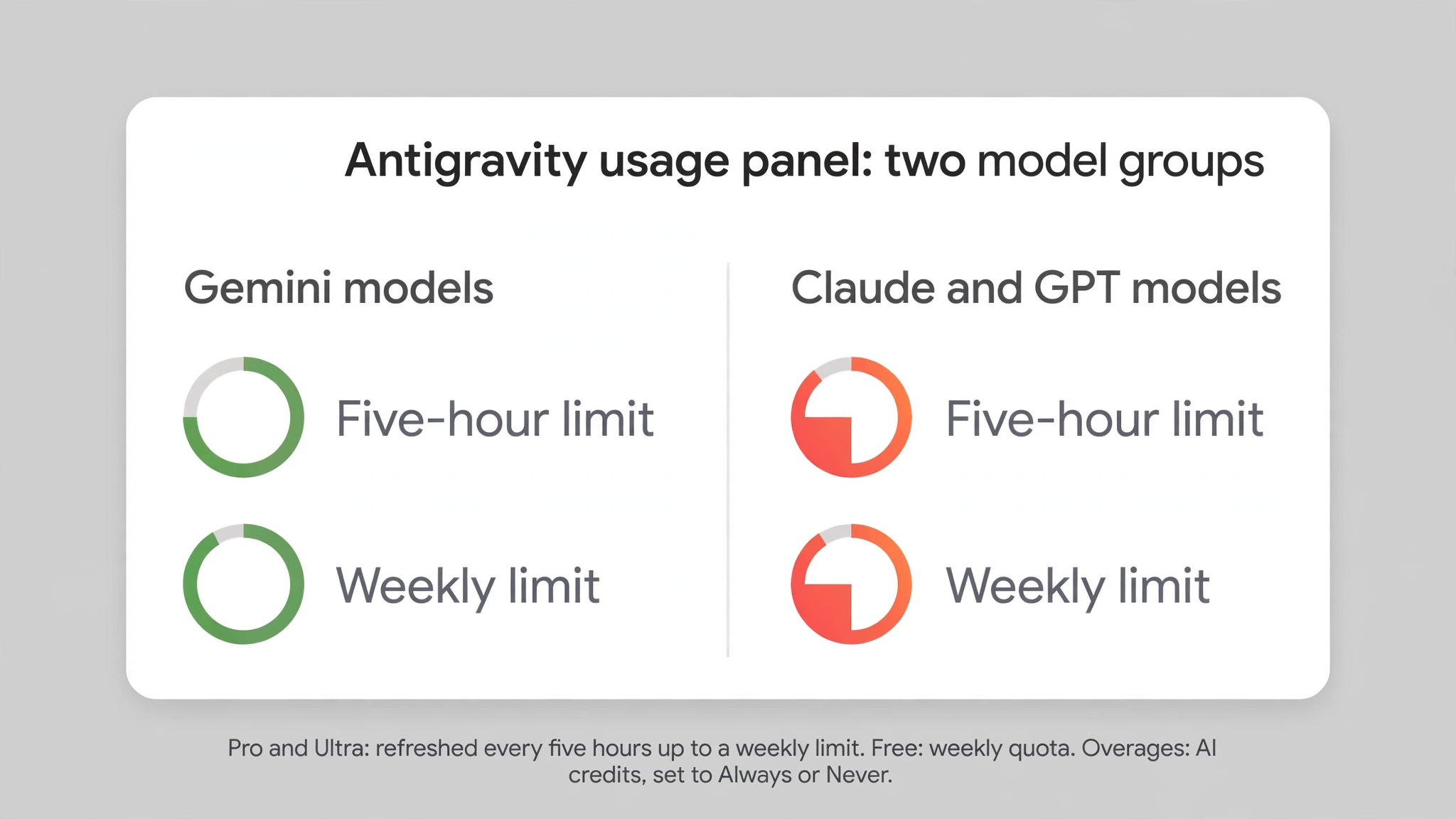
The 24% is an average against running Carbon alone on that benchmark; how many tasks you get still depends on your limits. Pro and Ultra quotas refresh every five hours up to a weekly cap, free accounts refresh weekly, and Google says usage tracks the work the agent does. The usage panel shows Gemini models and Claude and GPT models as two groups, each with its own five-hour and weekly limit. When one runs out, Pro and Ultra users can spend AI credits or wait.
What changes in Antigravity on November 18?
The models page and the pricing page both mark Claude Sonnet 4.6, Claude Opus 4.6 and GPT-OSS-120b as "Will be removed on November 18, 2026." Once that takes effect, Free and Plus accounts are left with Gemini 3.8 Flash, based on the table as listed on November 18. Paid Pro and Ultra keep Claude Sonnet 5.5 and Claude Opus 5.5 (thinking). Pro trials had the 4.6 models instead of 5.5, so trial users lose Claude in Antigravity.
Unconfirmed: a third-party Antigravity plugin's pull request, merged November 17, says Gemini 4 context in Antigravity doubled from 256K to 512K tokens. Google's changelog has no entry for it as of November 18. Google prices Hydrogen across a 1 million-token context window; we found no Google page stating Antigravity's in-app limit.
How does Orchestrator compare with Claude Code?
In our reading, the Claude Code feature closest to Orchestrator's division of labor is the opusplan model alias. It uses Opus in plan mode for reasoning and switches to Sonnet for execution. The difference is the trigger: the opusplan documentation describes switching by mode and says nothing about an automatic hand-back when execution gets stuck, while Orchestrator returns control to the planner on its own within the same turn.
Claude Code's subagents work differently from Orchestrator's single agent: each runs in its own context window with its own tools and permissions, counts toward the same usage limits, and can run on a faster, lower-cost model such as Haiku. To approximate Orchestrator's hand-back loop, combine opusplan with written re-planning rules. Unlike Orchestrator, the hand-back then depends on the model following your instructions:
Try it with your AI. Before pasting, run /model opusplan yourself in Claude Code (v2.1.265 or later; on older versions start Claude Code with --model opusplan) and switch to plan mode. Fill in every bracket. The hand-back here is an instruction the model follows, not an automatic switch like Orchestrator.
Work only inside [repo path] on this task: [describe the change]. If any bracket in this
message is still unfilled, stop and ask me.

1. Plan (read-only): do not edit files. Read the code the task touches and ask me what
   the code cannot answer. Write a numbered plan: files to change and the test or build
   command that proves each step. Add re-planning triggers: a check that fails twice, an
   interface that behaves differently than assumed, or an unsettled design choice. Show
   me the plan and wait for my OK before leaving plan mode.

2. Execute: follow the plan step by step and report each check as pass or fail in one
   line. Do not change the plan on your own.

3. Hand back: if a trigger fires, stop editing, summarize the command, error and files
   touched, revise only the affected steps, show me the changes and wait for my OK.

4. Review: when all steps pass, list anything skipped or changed, show me the exact full
   test command you plan to run ([full test command]) and run it after I confirm.

Do not install dependencies, read or edit secrets or credential files (.env, keys,
tokens), send data to outside services, write outside the repo, delete files or push to
git without asking me first.
FAQ
Is Antigravity Orchestrator free? No. Orchestrator (Argon) needs a paid Google AI Pro plan (or a trial on an eligible premium device), and Orchestrator (Carbon) needs Google AI Ultra. Free and Plus accounts don't get either option.
What happens if I message Orchestrator while Hydrogen is working? Hydrogen reports its progress to the planner, which checks the work against the plan and then wraps up, continues the remaining steps or updates the plan.
Can I set a thinking level for Orchestrator? No. It runs with a fixed configuration. Pick Carbon or Argon (Low, Medium, High) or Hydrogen (adds Extra) directly if you need to set reasoning depth.
Can a Claude model be the planner? Not today. The docs list only Carbon and Argon as planners; Google says more models and plans will come later.
What we have not tested
We have not run Orchestrator ourselves. This article is based on Google's and Anthropic's documentation and blogs as of November 18, 2026. Benchmarks are Google's; the 512K figure comes only from a third-party plugin pull request.
Related on claudefox
- Gemini 4 Carbon vs Claude Opus 5.5 and Fable 5.2: benchmarks and pricing compared
- How to call Gemini 4 Hydrogen from Claude Code: gemini-api CLI, Docs MCP and skills
- Gemini 4 Hydrogen vs Claude Sonnet 5.5 for coding: price, speed and benchmarks
- Gemini 4 Hydrogen costs $1.50/$7.50, and it only gets much cheaper than Carbon on December 1
Source: Gemini 4 Hydrogen and Orchestrator (Google Antigravity blog), Choose a model: Orchestrator (Antigravity docs), Introducing Gemini 4 Hydrogen (Google blog), Antigravity pricing, Antigravity plans and quota, Antigravity changelog, Swarm (/swarm) docs, Gemini 4 Carbon and /swarm (Google Antigravity blog), Claude Code model configuration: opusplan, Claude Code subagents, Third-party plugin PR reporting a 512K Antigravity context window (user report)
This story first appeared in the claudefox daily briefing for November 18, 2026.