PhoneBox turns an old Android phone into a desk panel and control deck for Windows, Linux and macOS
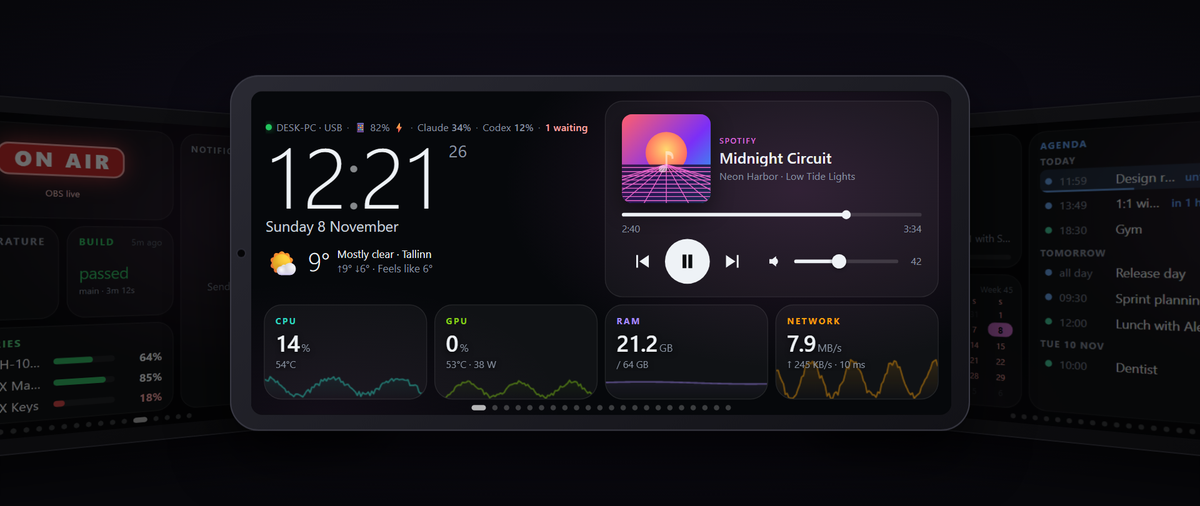
PhoneBox (ersinkoc/phonebox) turns an old Android 7.0+ phone into a desk panel and touch control deck for Windows, Linux and macOS: PC stats, Claude Code and Codex quotas and prompts, media keys and webhooks, over USB or paired Wi-Fi, with no cloud.
Updated November 17, 2026: Updated November 17, 2026 for PhoneBox 0.9.14: Android 7.0+ support, new News feeds, Discord and All apps widgets, app-in-front page rules, 11 languages, and fresh star, release and download counts.
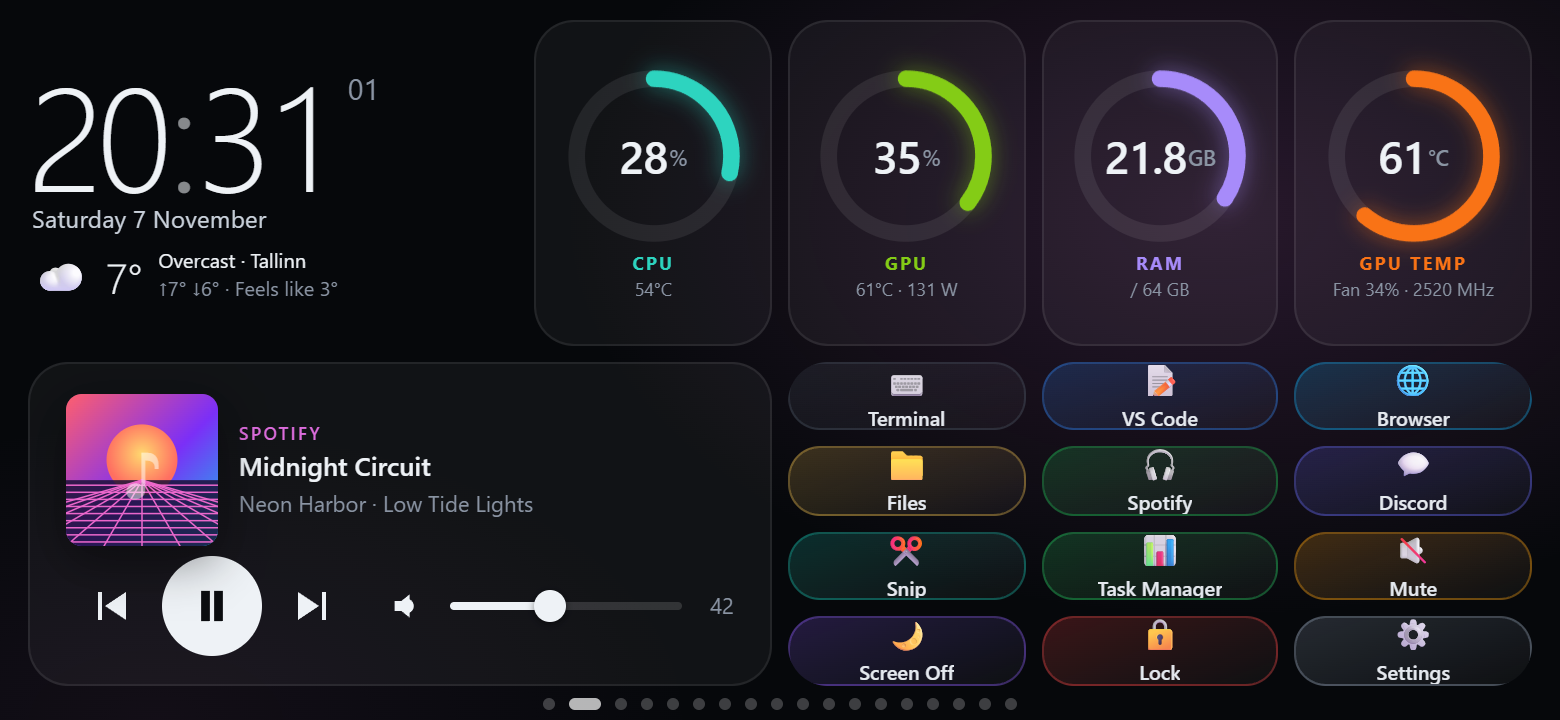
PhoneBox (GitHub: ersinkoc/phonebox) is a free, MIT-licensed project that turns an old Android phone into an always-on panel for your computer. An Android app runs full screen on the phone, and an agent on a Windows, Linux or Mac computer feeds it over USB, or over Wi-Fi or Tailscale after pairing. You build pages from 118 widgets and 30 templates: system stats, media, weather, news feeds, Stream Deck-style keys and Claude Code and Codex quotas, sessions and permission prompts. Created on November 7, 2026, the repo had 1,786 stars and 238 forks on November 17, after 31 releases in ten days.
Quick facts
- Computer: Windows 10/11 x64; Linux x64 or ARM64 with glibc; macOS on Apple silicon or Intel. No build for Windows on ARM or musl Linux (Alpine) yet.
- Phone: Android 7.0 or later since version 0.9.11 (minSdk 24, targetSdk 35; it was Android 9 before). The app asks for only two permissions, INTERNET and VIBRATE. No root on the phone, no admin rights on the computer.
- Stack: a self-contained .NET 10 agent (no .NET install needed) and a WebView panel written as plain JavaScript modules.
- Price and licence: free, MIT. No accounts, telemetry, analytics or crash reports, per the privacy policy.
- Version on November 17: 0.9.14 (November 16). Release assets had been downloaded 21,242 times in total, including 8,307 APK downloads.
- Languages: the panel and settings come in 11 languages, including English, German, French, Spanish, Russian and Chinese, and follow the phone or browser language by default (since 0.9.10).
How to install
The README's main route is a one-line setup script, run as your normal user (not as administrator, not with sudo):
# Windows (PowerShell)
irm https://raw.githubusercontent.com/ersinkoc/phonebox/main/setup.ps1 | iex

# Linux and macOS
curl -fsSL https://raw.githubusercontent.com/ersinkoc/phonebox/main/setup.sh | bash
Setup downloads the latest release, rejects a file that does not match the published SHA-256 checksum, and with a signed-in GitHub CLI also checks build provenance. It installs adb if missing (after asking; on Linux sudo is used only for packages), installs the agent for your user only, asks about starting at login, and can put the app on the phone over USB. --dry-run (-DryRun on Windows) changes nothing; --version pins a release. The release page also has the APK and agent zips with checksums, and Scoop works; a winget package awaits acceptance. None of the 31 releases is marked pre-release. With automatic updates on, the agent checks GitHub every 6 hours and updates itself and the phone app over USB.
First setup
USB is the recommended link. Turn on USB debugging in Developer options (on Xiaomi, Redmi and POCO also Install via USB), plug in a data cable and allow the computer. The phone then opens the panel whenever it is plugged in, and the settings open at 127.0.0.1:8765. Without developer options, install the APK by hand and pair over Wi-Fi with a QR code.
No account is needed, but some widgets stay empty without extras: GitHub needs gh auth login, AI quotas need Claude Code or Codex used on that computer, Windows CPU temperature needs LibreHardwareMonitor, and Spotify queue control needs your own client ID.
What stands out
- Claude Code permission prompts on the phone. Press Install hook and PhoneBox adds a PermissionRequest hook to ~/.claude/settings.json, keeping a backup. The phone shows project, tool and command with Allow and Deny; if nobody answers in time, Claude Code asks in the terminal as usual. It can be limited to when you are away from the keyboard.
- AI quota forecasts. Claude and Codex rings show reset times and a pace forecast of when you would hit the limit; tapping a session shows its model, timing and tokens.
- Calm rules. A rule such as 'an AI session needs you' can switch pages, but the phone counts down first, offers Stay or Go now, and waits while you touch the panel.
- Webhooks from anything. Scripts, CI or Home Assistant can POST values and notifications to the agent; other machines need a separate webhook key.
- A real control deck. Release 0.8.0 added 58 Control Deck widgets: per-app audio faders, push-to-talk, OBS, MIDI and OSC. Destructive power actions need a separate opt-in and a hold-to-confirm press.
What changed since November 15
- 0.9.10: translations into 11 languages; downloaded updates are checked against the release SHA-256 checksums before install, and a hung adb install no longer blocks updates (adb now has a 3-minute limit).
- 0.9.11: the app runs on Android 7.0 and later, tested by a contributor on an Android 7.1.1 phone. Shortcut keys on Windows send real scan codes, so apps that read raw input such as Discord see the right modifier keys.
- 0.9.12: a new rule condition, an app is in front, can switch the phone to a page while you use a named app (Windows, macOS with the Accessibility permission, Linux under X11 with xdotool; not Wayland). The Claude quota check asks Anthropic less often and the AI quotas now load on networks that announce IPv6 but do not route it.
- 0.9.13: a Discord widget (voice channel, mute, deafen, notifications; off by default and needs your own Discord application) and an All apps launcher widget for macOS, the panel runs on phones whose WebView is stuck on Chromium 83, and about 40 fixes from an outside review covering calendars, pushed values, settings and setup.
- 0.9.14: a News feeds widget for RSS and Atom feeds, fetched by the agent at most every 15 minutes and only while a page shows it; the weather now says Weather unavailable and retries after 2 minutes instead of loading for good.
How it works, and what reaches the network
The panel is a WebView that never talks to the computer directly: the app forwards its requests through adb reverse to the agent on 127.0.0.1:8765, or after pairing over HTTPS on port 8766 with a pinned certificate and a paired key. The loopback port rejects a foreign Host header or cross-site Origin; the Wi-Fi port serves only the panel API, and settings and pairing stay local. A pairing QR code holds a one-time code valid for 5 minutes, never the key. The phone sends only ids, never a command, path or URL, and tokens and keys are kept out of what it receives.
A project audit on November 10 fixed two webhook input bugs, one letting a chunked multibyte body slip past the size limit, and said physical Wi-Fi/USB failover and Android 9/10 hardware were not verified. Version 0.9.10 adds fixes from a second, evidence-led audit, each reproduced on the unchanged code before it was fixed.
Who builds it
Of 294 commits on main through November 16, 191 are by the maintainer, Ersin Koç; contributors such as Rudy Mizrahi Celekli (30), blx10 (20) and Touhidul Alam Seyam (12) and the GitHub Actions bot make up most of the rest. 27 commits carry a Claude Co-Authored-By trailer: eight from November 12 to 14, including the 0.9.5 release, and 19 on November 16 (17 naming Claude Opus 5.5 and 2 Claude Sonnet 5.5), from the maintainer and five contributors. There is no CLAUDE.md or AGENTS.md; the contributing guide welcomes AI-written code if the author reads the diff and runs the tests, and CodeRabbit reviews every pull request.
Try it with your AI. To wire your own scripts or CI to the panel through the documented webhook API, give this prompt to your coding agent:
Help me send status updates from [my script or CI job] to my PhoneBox panel.

First check: ask me to open http://127.0.0.1:8765 to confirm the PhoneBox agent is
running, and whether the sender runs on the same computer as the agent. If not, ask me
to confirm Wi-Fi & Tailscale is on and the phone is paired; do not change firewall
settings yourself.

1. Same computer: plain HTTP to http://127.0.0.1:8765, no key.
   Other machine: https://[pc-address]:8766 with the webhook key in an Authorization:
   Bearer header (not ?token=, which lands in logs), read from an environment variable
   [PHONEBOX_WEBHOOK_KEY]. Never print, log or commit the key, and never ask me to paste
   it into chat. The certificate is self-signed: do not turn off certificate checks
   (curl -k, verify=False) without asking me. A cloud CI runner cannot reach my home
   network unless it is on my Tailscale network.
2. Write a small function that POSTs JSON to /api/push/[key-name] with value, sub and
   level (ok, warn or error), and an optional ttl in seconds.
3. For failures, also POST to /api/notify with title, text and level.
4. Show me the code and where you will add it, and wait for my confirmation before
   editing files.
5. After I confirm, test once with curl against the local address and tell me what the
   phone should show. Do not install packages without asking, and do not touch other
   PhoneBox settings.
Known limits
- It can control your computer. Shortcuts, macros, command widgets and process killing run on the PC. The security policy asks you to keep the agent on loopback or the authenticated, pinned-TLS Wi-Fi link. Ending processes is limited to your own session, skips Windows-critical processes and can be turned off per widget.
- Network exposure. Wi-Fi stays off until you turn it on; then allow PhoneBox through the Windows firewall on Private networks only (on Linux, open TCP 8766 to the local network). New key in the settings unpairs every phone.
- USB debugging is powerful. It gives any computer you allow control over the phone, so allow only your own and revoke old authorisations in Developer options. A dedicated spare phone is the safer choice.
- Unsigned Windows build. SignPath signing is pending, SmartScreen may warn, and issue #69 reports Windows and an online sandbox flagging the download as a trojan. Setup installs only a file matching the release checksum. If Smart App Control blocks it, the README says not to turn that off. The macOS agent is signed ad hoc, not with an Apple Developer ID.
- Claude credentials. The Claude quota widget reads the OAuth token Claude Code stores in ~/.claude/.credentials.json and sends it only to Anthropic's usage endpoint, which the README calls undocumented. PhoneBox never refreshes the token. Session panels omit prompt and response text.
- Default connections. The agent pings 1.1.1.1 every 5 seconds (switchable from 0.9.6) and checks GitHub for updates; weather widgets send your chosen city's coordinates (Tallinn by default) to Open-Meteo.
- Gaps. Android 7 and 8 support is new in 0.9.11 and has been tested on only one Android 7.1.1 phone, no tray icon on Linux or macOS, no CPU temperature on macOS, and a ten-day-old project shipping several releases a day.
Related on claudefox
- CleanYourTV: debloat an Android TV or Google TV over Wi-Fi with Claude Code and get an Apple TV-style home screen
- Pinky lets AI agents use your iPhone or Android phone, with approvals and blocked apps
- couch-tv gives Google TV a clean home screen and a phone remote, with an optional Claude assistant
- llama-modchip runs the 284B DeepSeek-V4-Flash on a 64 GB PC with no GPU, using patched llama.cpp
Problems and feedback
Bugs go to GitHub issues (8 issues and pull requests were open on November 17); vulnerabilities go through GitHub's private vulnerability reporting, without tokens or pairing keys.
FAQ
Can PhoneBox work without a USB cable? Yes: install the APK by hand, turn on Wi-Fi & Tailscale and scan the pairing QR code. That phone gets no USB fallback, and app updates come from the release page.
Can other devices on my Wi-Fi control my computer through it? Only a paired phone with its key can use the panel API on port 8766, which is off by default. Other machines can only post webhooks, with a separate key that cannot open the phone API.
Does PhoneBox send my data to a cloud service? It has no servers, accounts or telemetry, and PC stats go only to your phone. The privacy policy lists each outside connection and how to turn it off.
How do I uninstall it? Run uninstall.ps1 or uninstall.sh from the README. Settings are kept unless you add -Purge or --purge; -Apk or --apk also removes the phone app.
Source: GitHub: ersinkoc/phonebox, PhoneBox README, PhoneBox releases, PhoneBox changelog, PhoneBox privacy policy, PhoneBox security policy, PhoneBox contributing guide, PhoneBox full-system audit (2026-11-10), PhoneBox Control Deck guide, PhoneBox Android build config, PhoneBox commit history, PhoneBox issue #69: virus detection, PhoneBox open issues and pull requests, PhoneBox live demo, PhoneBox releases 0.9.10 to 0.9.14, PhoneBox Android build config
This story first appeared in the claudefox daily briefing for November 16, 2026.