Pinky lets AI agents use your iPhone or Android phone, with approvals and blocked apps
Pinky is an open-source desktop app that lets Claude Code and other MCP agents operate a real iPhone or Android phone while you approve risky taps, block banking apps and keep recordings on your computer.
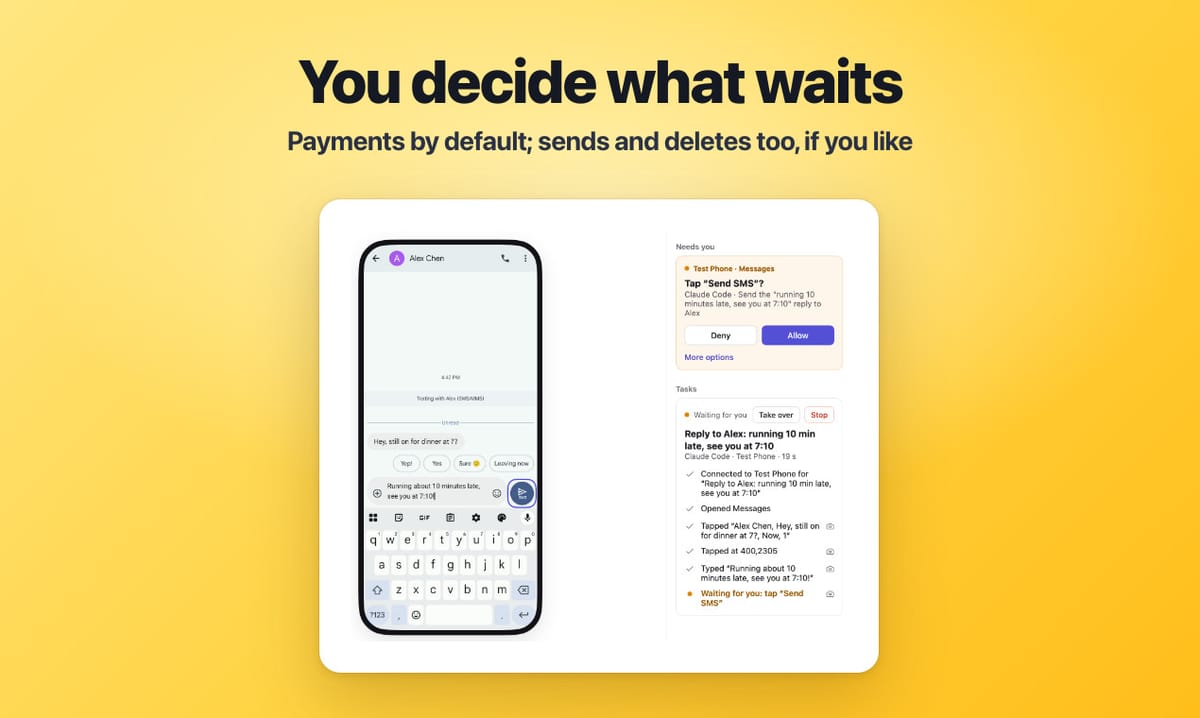
DIYgod/pinky is a free, Apache-2.0 desktop app that lets an AI agent operate a real iPhone or Android phone over MCP while you watch from your computer. Claude Code, Claude Desktop, Codex, Cursor or a script sends taps and keystrokes; Pinky's gateway sits between the agent and the phone: it holds risky taps until you click Allow, keeps banking, wallet and password-manager apps invisible to agents, masks one-time codes and records every run. Created on 6 November 2026, it had about 2,200 stars and 240 forks on 15 November. The README calls it pre-alpha.
Quick facts
- Desktop: macOS 13 or later (Apple silicon or Intel), Windows 10/11 x64, Linux x86-64 with glibc 2.29+ and GTK 3.
- Phones: Android 10 to 17; iPhone and iPad on iOS 17.4 or later. iOS 17.3 and earlier are not supported.
- Agents: anything that speaks MCP, over stdio (pinkyctl mcp) or HTTP with an agent token. Claude Code is the one the README says has driven real phones end to end.
- Licence and cost: Apache-2.0, free, no account.
- Built with: Go 1.27.3 without cgo, a native GPU-drawn window via MyGo (no Electron), a Kotlin Android companion app. Desktop installers in the 15 November release were roughly 26 to 35 MB.
- Release pace: 158 releases between 7 and 15 November 2026, versioned by date.
How to install
Only install from the project's GitHub releases page or its Homebrew tap. On a Mac, download the arm64 or amd64 .dmg, or run brew install --cask diygod/tap/pinky. On Windows, run pinky-setup-<version>-amd64.exe; it installs per user without admin rights, but the installer is not signed yet, so SmartScreen may warn; choose More info, then Run anyway. On Debian or Ubuntu, install the .deb with apt; elsewhere unpack the .tar.gz into its own folder. There is no beta channel: none of the 158 releases is marked pre-release. Pinky updates itself by default once no agent is working and the app has been idle for ten minutes; Settings › Advanced turns that off. Anonymous usage statistics and crash reports are on by default; Settings › Privacy or DO_NOT_TRACK=1 turns them off.
First setup
Android: turn on USB debugging, plug the phone in and allow the computer. Pinky brings its own adb and offers to install its companion app, which reads the screen in about 70 ms instead of about 2 s. Android 11 and later can pair over Wi-Fi.
iPhone: trust the computer, turn on Developer Mode, and let Pinky mount Apple's developer disk image from Xcode. On iOS 27 and later nothing is installed on the phone. On iOS 17.4 to 26, taps and typing need Pinky's own app with Appium's WebDriverAgent, built and signed with your Apple ID on a Mac with Xcode; with a free Apple ID it expires every 7 days. Without it, Pinky can only watch and open apps (plus OCR screen reading on macOS): no taps or typing. Without Xcode (Windows, Linux), copy the image from a Mac, or let Pinky download it, only on your click, from a third-party GitHub mirror (not Apple), checksum-verified.
Agent: Settings › Agents › Connect adds Pinky to the agent's MCP config and installs a SKILL.md guide. For Claude Code by hand: claude mcp add --scope user pinky -- pinkyctl mcp. The first time an agent connects, Pinky asks whether to allow it and what scope it gets. No phone yet? Quit Pinky and start it with --fake (on a Mac /Applications/Pinky.app/Contents/MacOS/Pinky --fake, on Linux pinkyctl --fake) for two scripted demo phones with a payment to approve, a blocked banking app and a password field. Remote agents can connect over HTTP, which is off by default, local-only and needs an agent token.
What stands out
- Approvals live outside the agent. A risky tap returns approval_pending to the agent and nothing happens on the phone until you click Allow; the agent has no call that could approve it. The call waits up to 45 seconds, then the agent repeats it; an approval unanswered after 60 seconds counts as no. Pinky recognises payment, send, delete and similar buttons by their labels in 10 languages.
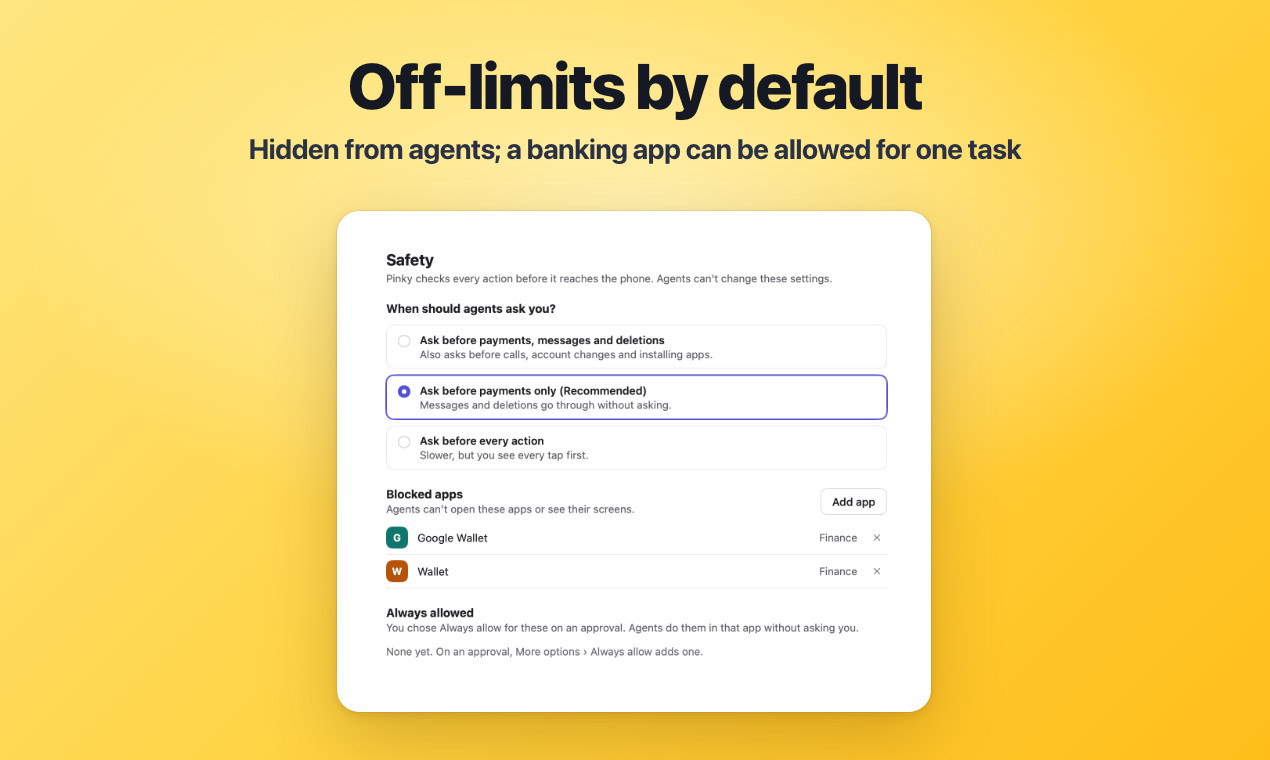
- Off-limits apps and masked secrets. Banking, wallet and password-manager apps are invisible to agents by default, agents cannot type into password or one-time-code fields on real phones, and a code in a message reaches the agent as dots. A blocked banking app can be allowed for a single task; password managers are never offered.
- A hidden second screen on Android 13 and later, so the agent works on a background display while your own screen stays yours, or off and locked. Touching the phone or its mirror pauses the agent.
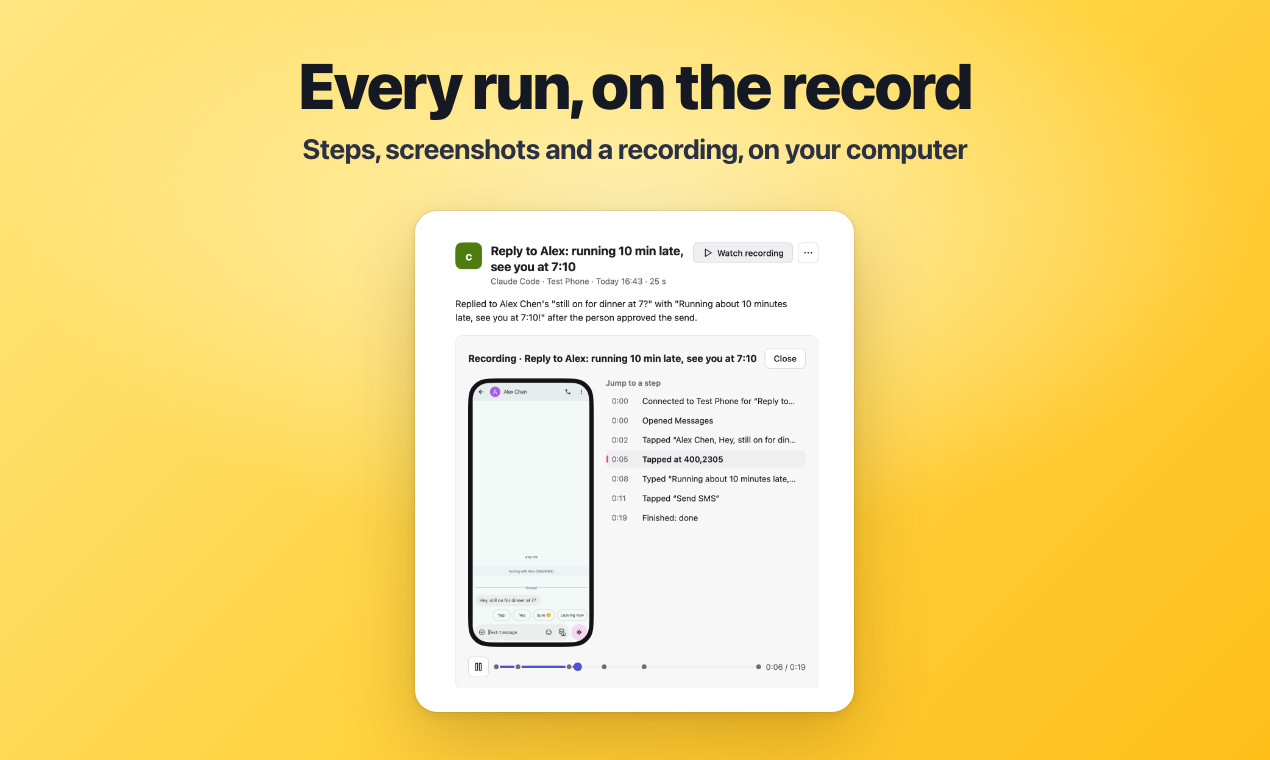
- Everything is recorded locally for 30 days by default: plain-language steps, screenshots and a screen recording per task. An agent gets the recording only if you approve it at each export.
- Tools for app developers: installs and uninstalls ask you; reading an app's logs asks on first read unless it is a debug build; rotation, language or location changes ask on real phones and are undone when the task ends.
How it was built with Claude
The evidence is in the repository. Of 1,372 commits on main up to 15 November, about 1,290 (roughly 94%) carry a Co-Authored-By trailer naming Claude, almost all Claude Opus 5.5. The contributor guide, docs/WORKING.md, says several agent sessions build Pinky in parallel, each owning part of the code (Android driver, iOS driver, companion app, desktop client) with a main session that integrates, and requires every commit to end with the Claude Opus 5.5 trailer.
It also sets rules for agents testing on the owner's real phones: hold a per-device lock, stick to the home screen, Settings (read only), Calculator, Clock and Pinky's own apps, and never message, pay, sign in or open apps with personal data. CLAUDE.md adds the release routine: changelog bullets in English and Chinese, tagged only through scripts/release.sh.
Try it with your AI. Paste this into Claude Code (or another MCP agent) to set Pinky up cautiously, starting with the fake demo phones before a real one.
Help me try Pinky (github.com/DIYgod/pinky) safely with [Claude Code / my MCP agent].
1. First check my OS version (sw_vers, uname or systeminfo is fine): Pinky needs macOS
   13+, Windows 10/11 x64, or Linux x86-64 with glibc 2.29+ and GTK 3. Stop if
   unsupported.
2. Install only from the official GitHub releases page, or on a Mac with: brew install
   --cask diygod/tap/pinky. Show me the command and wait for my confirmation.
3. Have me quit Pinky and restart it with the demo phones:
   /Applications/Pinky.app/Contents/MacOS/Pinky --fake on a Mac, pinkyctl --fake on
   Linux.
4. Connect the agent through Pinky's Settings › Agents › Connect. For Claude Code by
   hand: claude mcp add --scope user pinky -- pinkyctl mcp
5. On a demo phone, attempt the scripted payment so Pinky asks for approval, and explain
   what I see. Do not invent other tasks.
6. Before I connect a real [Android/iPhone], explain the options in Settings › Safety
   (by default only payments ask) and in Settings › Privacy. Show me and change nothing
   until I confirm.
Rules: never run adb, fastboot or other phone commands outside Pinky, never open
password, banking or wallet apps, never delete anything, and never ask me for PINs or
API keys in chat.
Known limits
- Pre-alpha. Some built features still wait for someone to try them on a real phone, per the README and docs/ACCEPTANCE.md.
- The default only asks before payments. Messages, deletions and other actions go through without asking unless you change Settings › Safety. The project admits that because it spots risky buttons by label, an unusual one could slip through; Ask before every action and Read-only mode exist for more control.
- Anonymous usage statistics and crash reports are on by default with no first-run notice; turn them off in Settings › Privacy or with DO_NOT_TRACK=1. The project says screens, typed text, app names, phone identifiers, PINs and file names are never sent.
- Android needs USB or Wireless debugging, plus the companion's accessibility service during tasks; some banking apps refuse to run while either is on, and agent use may break some apps' terms.
- Wi-Fi on Android 10 and the Tailscale away-from-home mode make adb listen on port 5555 until the phone restarts or you turn it off; computers the phone does not already trust make it ask, so tap Cancel on prompts you did not expect. Below iOS 27, the Wi-Fi link to Pinky's iPhone app is not encrypted, and while Pinky streams an iPhone some banking apps detect screen sharing.
- An agent that can run shell commands could reach the phone through adb and skip Pinky's rules entirely. The README advises sandboxing such agents or plugging the phone into another computer and connecting over HTTP.
Related on claudefox
- PhoneBox turns an old Android phone into a desk panel and control deck for Windows, Linux and macOS
- CleanYourTV: debloat an Android TV or Google TV over Wi-Fi with Claude Code and get an Apple TV-style home screen
- TV Detox gives an old Android TV a 30 MB ad-free home screen and a Claude Code cleanup you can undo
- Apple's official Xcode plugin for Claude Code: install with xcode@claude-plugins-official
Problems and feedback
Report bugs as GitHub issues on DIYgod/pinky; Help › Send Feedback opens one with diagnostics filled in for you to review and submit. A Discord server is linked from the README.
FAQ
Does my phone's screen go to the cloud? Not through Pinky itself: screenshots, recordings and history stay on your computer. But whatever the agent reads, and any screenshots or reports it saves, go to that agent and therefore to its model provider.
Can an agent approve its own risky step? No, according to the project. Approvals are enforced in Pinky's gateway, the agent has no command to confirm one, and Pinky checks the button is still in place before acting.
Will my banking app notice Pinky? It can. Banks in Malaysia and Singapore, among others, refuse sign-in while a sideloaded accessibility service is on. Pinky turns its service on only during tasks, so take over or end the task before using one.
Can I use an iPhone without a Mac? On iOS 27 and later, yes, nothing is installed on the phone, given the disk image. On iOS 17.4 to 26, taps and typing need Pinky's iPhone app, which is installed from a Mac with Xcode.
Can it run without my own agent? Yes. Ask Pinky runs tasks on one phone with a model and API key you add, from DeepSeek, Qwen and Kimi to Anthropic, OpenAI, Gemini or local Ollama and LM Studio. Each task stops at 100 steps, 20 minutes or US$2 by default, and the key is kept in the Mac Keychain, Windows Credential Manager or your Linux keyring. Pinky's phone app can also run tasks with no computer.
Source: DIYgod/pinky on GitHub (README), Pinky releases, Pinky changelog, Pinky MCP reference (docs/mcp.md), Usage statistics, crash reports and feedback (docs/TELEMETRY.md), Working on Pinky (docs/WORKING.md), Pinky CLAUDE.md, Phones away from home (docs/away-from-home.md)
This story first appeared in the claudefox daily briefing for November 15, 2026.