Kanzo puts a kanban board and an MCP server for coding agents in one 4.7 MB binary
Kanzo (emanuele-em/kanzo) is a self-hosted kanban board and MCP server in one 4.7 MB Rust binary, so you and coding agents like Claude Code and Codex take, move and comment on the same tasks, on one computer or a shared board. AGPL-3.0.
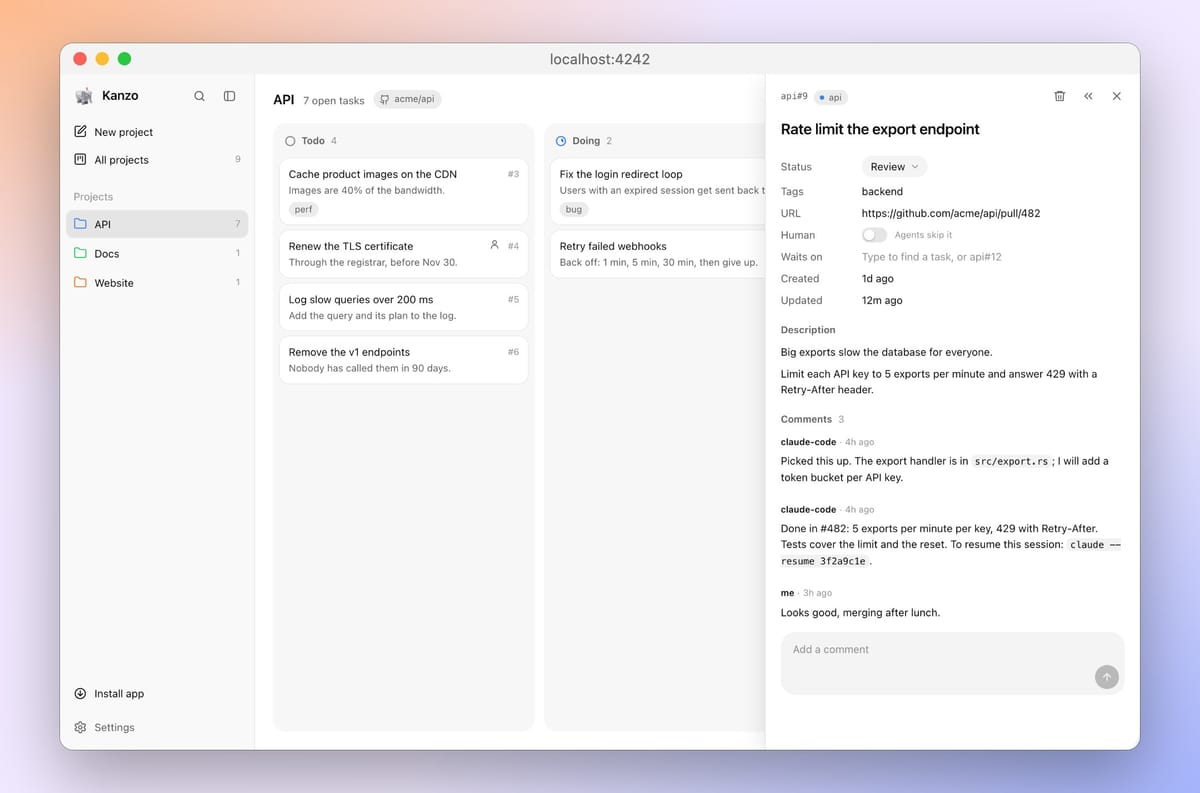
Kanzo (GitHub: emanuele-em/kanzo) is a kanban board that you open in a browser and that your coding agents reach as an MCP server, both served by one program. You add and drag cards; Claude Code, Codex or another MCP client takes the next task, moves it to doing, comments on its progress and leaves it in review. There is no account and no external server. Created on October 25, 2026, the repo had, as of November 16, 2026, 1,207 stars and 99 forks.
Quick facts
- What it is: a Rust program (edition 2024, Rust 1.89 or newer to build) with SQLite built in. The author lists it at 4.7 MB, 5 MB of memory when idle and a 3 ms start, measured on an Apple M4.
- Platforms: release builds for macOS (Apple silicon and Intel), Windows x64, and Linux on x86_64, ARM64, ARMv7 and ARMv6 (musl builds, which covers Raspberry Pi boards).
- Price and licence: free, GNU AGPL-3.0-only. No accounts or sign-in of any kind.
- Version: 0.4.2, released November 11, 2026; eleven releases since October 26, none marked pre-release.
- Downloads: 3,451 installer and binary downloads as of November 16, 2026.
- Interfaces: browser board, kanzo CLI, MCP.
How to install
The README offers an install script per platform, a Windows zip, and Cargo. On macOS and Linux:
curl -LsSf https://github.com/emanuele-em/kanzo/releases/latest/download/kanzo-installer.sh | shOn Windows, in PowerShell (Bypass lifts the script-execution policy for this one command only):
powershell -ExecutionPolicy Bypass -c "irm https://github.com/emanuele-em/kanzo/releases/latest/download/kanzo-installer.ps1 | iex"Both scripts fetch prebuilt binaries, so no Rust toolchain is needed; only cargo install kanzo builds from source. They put kanzo in ~/.cargo/bin, which new terminals pick up; in the terminal you installed from, run source $HOME/.cargo/env first, or you get command not found. On Windows you can also put kanzo.exe from the zip in a folder named bin on your PATH, the only place self-update works. Releases carry GitHub artifact attestations, so a downloaded file can be checked with gh attestation verify against the repo before you run it. Later, kanzo update or the sidebar installs new versions.
First setup
Run kanzo. It creates a ~/kanzo folder on first start (the board lives in kanzo.db, settings in config.toml) and opens the board at localhost:4242. kanzo --port picks another port and --home (or KANZO_HOME) another data folder; kanzo service install keeps it running and starts it at login, and kanzo service uninstall removes that. The README documents no full uninstaller. Then register it with your agent. For Claude Code the README gives claude mcp add kanzo --scope user -- kanzo mcp, and for Codex codex mcp add kanzo -- kanzo mcp; restart the agent afterwards.
How agents connect
Agents have two documented routes. The usual one is stdio: the agent launches kanzo mcp itself, and that process finds the project from the git remote of the repository the agent is working in, so one board serves several repos. The other is MCP over HTTP at localhost:4242/mcp on the running board, for clients that prefer a URL (mcp_http in config.toml turns it off). Other clients, such as Raycast, can run kanzo mcp using the full path from which kanzo. Its ten tools: list_projects, create_project, link_repo, list_tasks, get_task, create_task, update_task, add_comment, next_task and delete_task. next_task takes the top todo task and moves it to doing in one step. The tool list costs about 1,000 tokens per session; replies 10 to 60.
Scripts use the kanzo CLI (export, share, join, sync, leave). The board's own HTTP API is not documented as a public interface.
What stands out
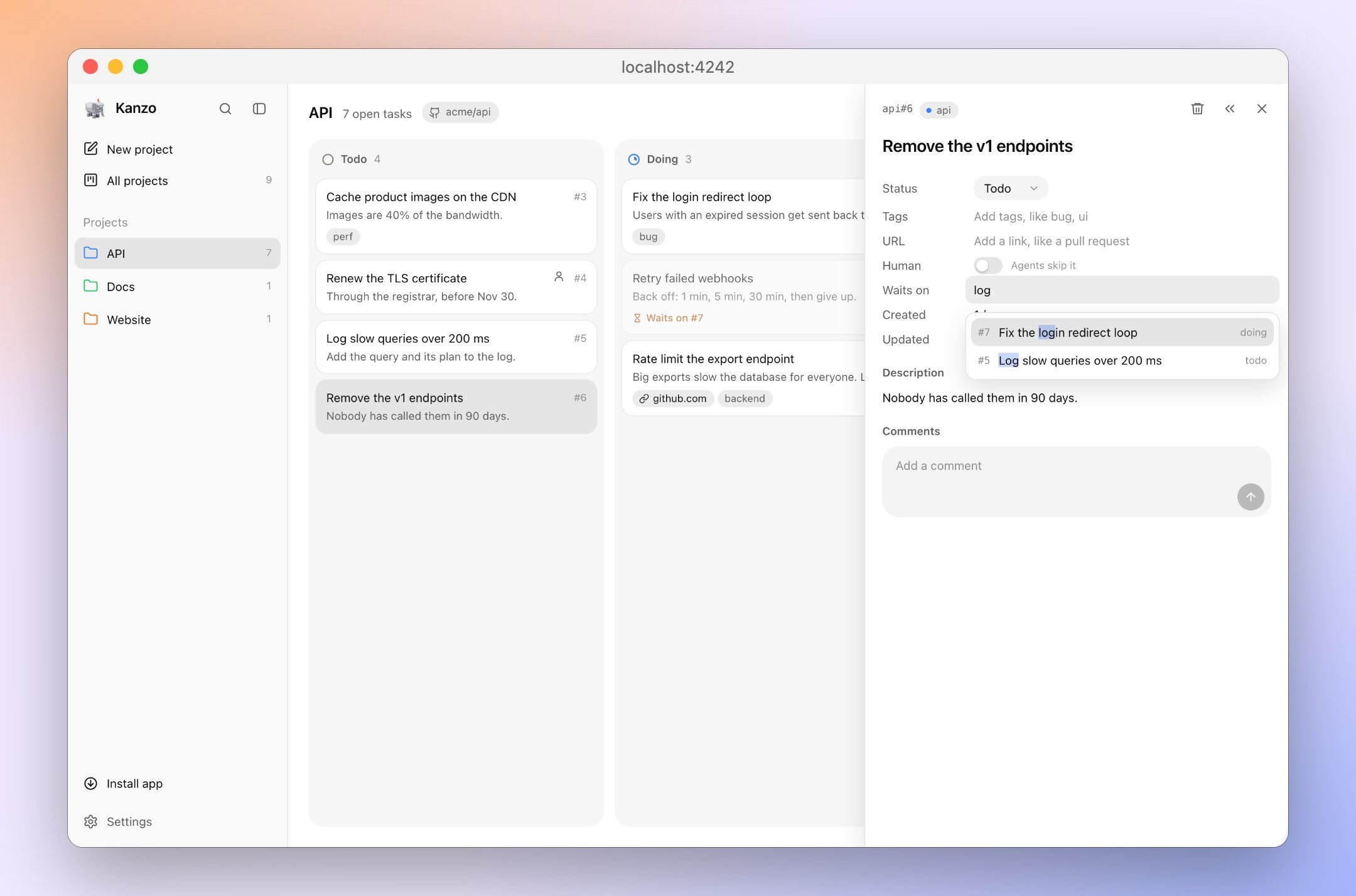
- Human-only tasks. Marking a task Human makes agents skip it, and a Backlog column (off by default) holds ideas agents should not pick up until you move them to todo.
- Dependencies between tasks. A task can wait on others; next_task skips it until all of them are done; review still counts as blocking.
- Resumable handoffs. Kanzo tells agents to comment how to resume their session when they move a task to review.
- One filter language everywhere. The board filter, search and the agents' list_tasks and next_task accept the same GitHub-style qualifiers, such as tag:billing -status:done.
- Two ways to use several machines. Share one live board on a trusted network or over a VPN, with a Raspberry Pi as host, or carry it between machines with kanzo sync through your private repo.
Who builds it
Of 259 commits on main through November 11, 235 come from the author, Emanuele Micheletti; the rest from eleven outside contributors and Dependabot. Seven contributor commits carry a Claude Opus 5.5 Co-Authored-By trailer. The repo has no CLAUDE.md or AGENTS.md. CI comments on each pull request with its effect on size, memory, speed and agent tokens.
Try it with your AI. To set Kanzo up as the task board for your own coding agent, give this prompt to Claude Code (or adapt the MCP command for Codex):
Help me set up Kanzo (github.com/emanuele-em/kanzo) as a task board for you in [path to
my repo].

1. First check: run kanzo --version. If it is missing, show me the official install
   command from the Kanzo README for my OS, tell me it pipes a remote script into the
   shell, offer gh attestation verify as an optional check, and wait for my
   confirmation. Do not install anything else.
2. Check whether a board is already running at http://localhost:4242. If not, tell me to
   run kanzo myself, or ask before you run kanzo service install.
3. Show me this command, note that --scope user registers Kanzo for all my projects, and
   wait for my confirmation: claude mcp add kanzo --scope user -- kanzo mcp. Then tell
   me to restart you.
4. After the restart, call list_projects and confirm a project matches this repo's git
   remote; if none does, ask me before create_project or link_repo. Create these tasks
   in todo: [task 1], [task 2]. Mark [task needing my decision] as human so you skip it.
5. Take the next task with next_task, comment as you work, and when you move it to
   review, comment how I can resume this session.

Rules: do not change listen in ~/kanzo/config.toml, do not run kanzo share on or kanzo
join, do not set up sync, never call delete_task, and never put secrets, tokens or keys
in tasks or comments. Ask me first if any step needs a network change.
What AGPL-3.0 means if you self-host or change it
Kanzo is under the GNU Affero General Public License, version 3 only. Running the released program for yourself or your team, unmodified, puts no extra duty on you. If you redistribute it, alone or bundled with other software, you pass on the same licence and the corresponding source for Kanzo and works based on it, as with the GPL; unrelated programs shipped alongside it are not covered. Section 13 adds the network rule: if you modify Kanzo and people use your modified version over a network, for example teammates joining your patched shared board, you must offer those users the source of your version at no charge. Companies with policies on AGPL software should check with their legal team; this is a summary, not legal advice.
Known limits
- No logins at all. The security policy is explicit: by default the board listens only on 127.0.0.1, but once you share it or set listen = "0.0.0.0", anyone who can reach the port can read and change the board and use its MCP endpoint. Share only on a trusted network or VPN. It does guard against DNS rebinding and cross-site requests.
- Prompt injection on shared boards. Anyone who can reach a shared board can add or edit tasks that connected agents then pick up with next_task and act on. Review tasks from others before an agent takes them, or mark them Human.
- Agents act with your trust. An agent connected over MCP can create, edit and delete tasks; delete_task removes comments and images too and cannot be undone. Keep secrets out of task text.
- Sync goes through git. kanzo sync commits everything in ~/kanzo except config.toml, so the whole board goes to the repo you name; use a private repo.
- Older CPUs. Issue #59, open as of November 16, 2026, reports the 0.4.2 x86_64 Linux binary crashing with an illegal instruction on an Intel Celeron NAS; the reporter's own build from source with a generic x86-64 CPU target ran.
- Young project. It is three weeks old, at version 0.4.
Related on claudefox
- BLA (bla-agents): a CLI and MCP server that trips AI reverse-engineering limits on release files
- PhoneBox turns an old Android phone into a desk panel and control deck for Windows, Linux and macOS
- Floorplan: a Claude Code and Codex plugin that maps your codebase in plain English
- TV Detox gives an old Android TV a 30 MB ad-free home screen and a Claude Code cleanup you can undo
Problems and feedback
Bugs and ideas go to GitHub issues; the contributing guide asks for an issue before anything bigger than a small fix. Security problems go through the Report a vulnerability form on GitHub, not public issues.
FAQ
I ran the installer and kanzo is not found. What now? Open a new terminal, or run source $HOME/.cargo/env in the current one.
Can I run it in Docker or behind a reverse proxy? There is no official image; a container pull request and a hosts setting for reverse proxies were open requests as of November 16, 2026.
Can I get my tasks out? kanzo export prints the board as Markdown, or JSON with -f json.
Source: GitHub: emanuele-em/kanzo, Kanzo README, Kanzo releases, Kanzo changelog (0.4.2), Kanzo security policy, Kanzo contributing guide, Kanzo LICENSE (GNU AGPL v3), Kanzo Cargo.toml, Kanzo MCP registry entry (server.json), Kanzo MCP tools (src/mcp.rs), Kanzo commit history, Kanzo issue #59: illegal instruction on older x86_64 CPUs, Kanzo issues and pull requests
This story first appeared in the claudefox daily briefing for November 16, 2026.