Threadbear: a desktop app for running Claude Code and Codex threads
Threadbear is a desktop app for running Claude Code, Codex, Grok, Cursor, OpenCode and Gemini threads, on the subscriptions you already have.
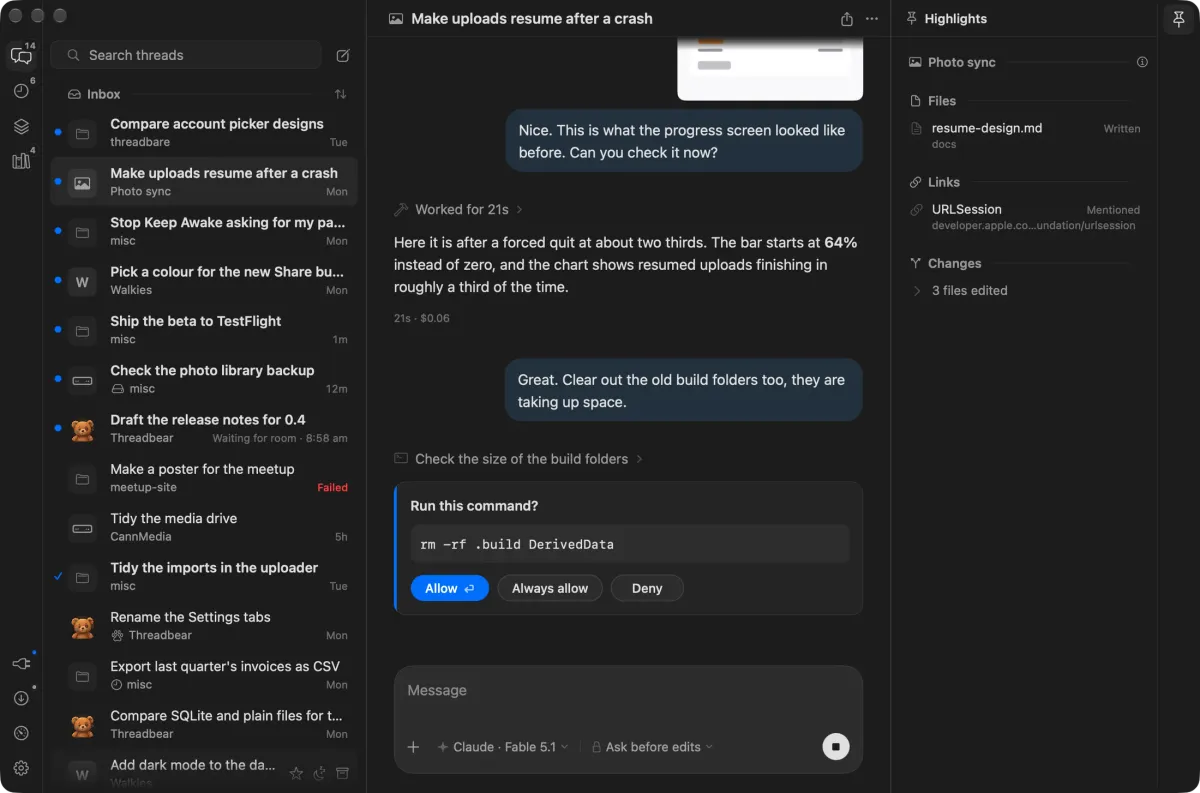
mikecann/threadbear gives you a desktop app for keeping your coding-agent threads going, answering them when they need you, and following them from your phone. It is built around the Claude Code and Codex subscriptions you already have, rather than a new service account.
What is Threadbear?
Threadbear is a desktop app for running Claude Code, Codex, Grok, Cursor, OpenCode and Gemini threads, on the subscriptions you already have.
The maintainer made it for personal use and gives you the whole thing: the source, the desktop app, a small runner that keeps your agents going when the app is closed, and a Convex backend in your own account so the iPhone and Android apps and a web page for each thread can follow along. None of it runs on a server of the maintainer, so the maintainer never sees any of it.
A thread is one conversation with an agent, working in one folder on your Mac. You say what you want done, the agent does it, and you can come back days later and carry on, because each thread remembers its whole conversation.
Who is Threadbear for?
Threadbear is for people who already run Claude Code or Codex and want to start, watch and answer those threads in one place, including from a phone.
The desktop app runs on Mac, Windows and Linux. The installation steps in the README are written for a Mac for now: a Mac with Apple silicon, on macOS 26 or later, with Xcode command line tools and Node 24 or newer. You also need Claude Code or Codex, installed and logged in, a free Convex account, and the GitHub CLI to make your fork.
Grok, Cursor, OpenCode and Gemini can run threads too, through their own CLIs, but titles and the librarian need a Claude login.
Is Threadbear free and open source?
Yes. Threadbear is open source under the MIT licence, and it runs on the Claude Code and Codex subscriptions you already have.
You get all of the source, so when something bugs you, you can change it. Setup uses a free Convex account, and the guide says the free plan is enough for one Mac's ordinary use.
GitHub lists about 170 stars as of November 22, 2026, TypeScript as the repository's main language, and release/2026-11-22 as the latest release, published November 22, 2026.
What stands out
- Decisions: when a thread needs you, it says exactly what it needs, with the choices as buttons.
- Options: when the agent is not sure how something should look, it shows you a few designs side by side.
- A separate runner: a small process called the runner owns the agents, so closing, quitting or updating the app never stops a turn.
- Phone follow-along: threads sync through your own Convex deployment, so your phone keeps working when your laptop is asleep.
- Patches: a patch is a small TypeScript file that adds panels and buttons, and your agent can write one for you.
How do I install Threadbear on Mac?
You install Threadbear on a Mac by forking the repository, cloning your fork, and running its setup script.
From the project's README at https://github.com/mikecann/threadbear/blob/main/README.md
gh repo fork mikecann/threadbear --clonecd threadbear./threadbear setupSetup checks your Mac, logs you in to Convex, makes a Convex project in your account and deploys the backend and website to it, then builds and installs the runner and the Mac app. The first build takes 20 to 40 minutes and needs about 5 GB free, and it installs Rust if you have not got it.
For your phone, get Threadbear for iPhone or for Android and pair it from Settings, Phone and browser on the Mac, which shows a code to scan. The Releases page is at https://github.com/mikecann/threadbear/releases
How it was built with Claude
The repository contains a CLAUDE.md file that points to AGENTS.md, and a .claude folder with a settings file. Recent commits also carry Co-Authored-By trailers naming Claude.
Try it with your AI. Paste this into your own AI assistant to try Threadbear safely on your Mac.
Help me install Threadbear from mikecann/threadbear on my Mac, using only the official
commands and interfaces named in its README. First check that I have a Mac with Apple
silicon on macOS 26 or later, Xcode command line tools, Node 24 or newer, and Claude
Code or Codex installed and logged in, plus a free Convex account and the GitHub CLI.
Show me any risky step first and wait for me to confirm it before you run it. Then run:
gh repo fork mikecann/threadbear --clone, cd threadbear, ./threadbear setup --dry-run,
and then ./threadbear setup with my Convex project name [your Convex project name]. Do
not install anything from unknown sources, do not touch credential files, and do not
delete anything. If a step needs a login in my browser, stop and tell me what to
approve.
What are Threadbear's limits?
- The installation steps are written for a Mac for now, although Windows and Linux work too.
- Titles and the librarian need a Claude login, even though Grok, Cursor, OpenCode and Gemini can also run threads.
- New threads start with full access by default, the same as running the CLIs with permissions skipped, and Threadbear does not sandbox an agent.
- Full sync is off to start, so tool output stays on your Mac unless you turn it on, and it is scrubbed first, which is not a guarantee.
- The Android app is not on Google Play yet, so you install it yourself from GitHub, where each release puts a new copy.
- Only the latest main is supported.
Related on claudefox
- PhoneBox turns an old Android phone into a desk panel and control deck for Windows, Linux and macOS
- Gemini, Codex, GPT and other AI coding models: our coverage
- Floorplan: a Claude Code and Codex plugin that maps your codebase in plain English
- External sandboxes for coding agents: run Claude Code, Codex and Pi commands in a Linux guest with npx or uvx
Problems and feedback
Report problems on the Issues page at https://github.com/mikecann/threadbear/issues. For a new feature, or anything big, open an issue first and say what you would like to build. If you find a security problem, use GitHub's private vulnerability reporting instead of opening a public issue.
Source: mikecann/threadbear repository, Threadbear README, Threadbear INSTALL.md, Threadbear user guide, Threadbear SECURITY.md, Threadbear CONTRIBUTING.md, Threadbear LICENSE, Threadbear releases, Threadbear issues, Threadbear website
This story first appeared in the claudefox daily briefing for November 22, 2026.