cinematic-skill: turn a script and a voice into a narrated cinematic film built from code
Moh4696/cinematic-skill is an agent skill that turns a script and a voice into a narrated cinematic film built entirely from code, with one continuous camera over photos, maps and cards.

What it is
Moh4696/cinematic-skill is an agent skill called cinematic-film that turns a short script and a voice recording into a finished narrated film without shooting footage or using a video generator. Your coding agent plans the story, places photos, documents, cards and maps on one large board, and moves a single camera across that board while the narration plays.
The finished film is not a slideshow. The camera glides from one item to the next, a spotlight picks out the item each line is about, and stamps, highlights and counters land on the exact word the narrator says. Nothing is generated video: every frame is drawn by code, using Skia in Python, so the film renders the same way every time and a new voice re-times the whole film by itself.
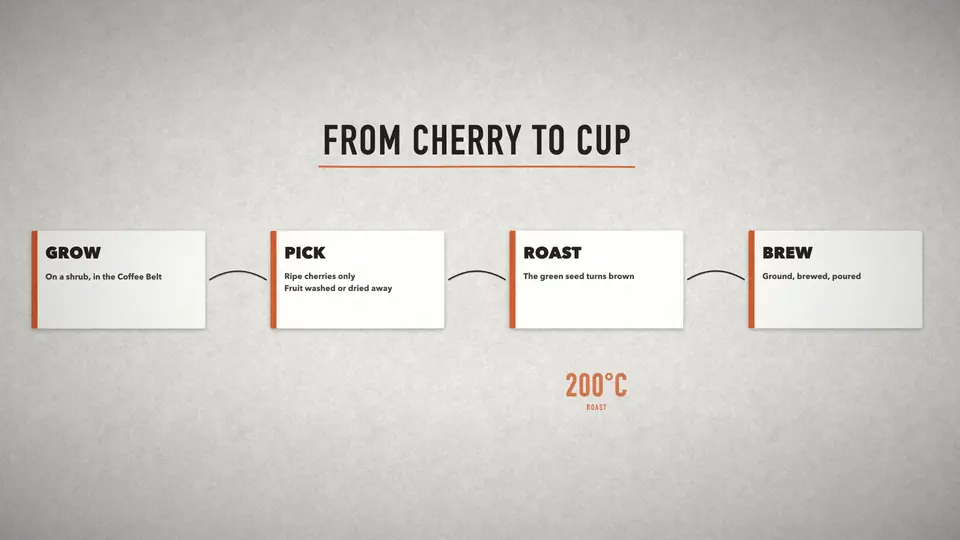
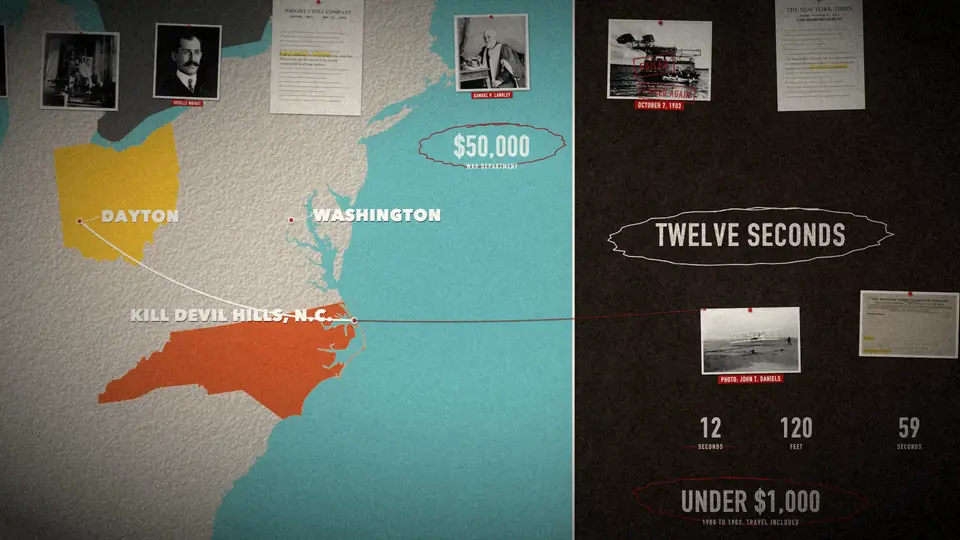
The repository ships with two examples. Twelve Seconds is a 90 second documentary about the first flight, made from seven public-domain photos, and From Cherry to Cup is a 25 second starter explainer in the studio look, built from cards, arrows and a counter, with no images at all.
Who it is for
It is for people who want to make a documentary, a history or true-crime film, a product launch, a brand or founder story, a science or technology explainer, or a biography, and who already work with a coding agent. The skill works with Claude Code, Codex, Cursor, Gemini CLI and OpenCode.
It fits a reader who is comfortable running Python scripts and checking a setup report. The scratch voice is free: macOS uses its built-in say command and Linux uses espeak-ng, so you can time the film before you record or buy a final voice. On Linux and Windows, a font fetcher supplies the open-licensed fonts those systems cannot match.
Quick facts
- Free of charge under the MIT License, and written in Python.
- About 660 GitHub stars and about 100 forks as of November 17, 2026.
- Created on November 9, 2026. No GitHub release or tag had been published when I read it, so you install from the main branch.
- The skill is named cinematic-film.
- Needs Python 3.9 or newer, ffmpeg on your PATH, and Node 22.20 or newer for the main installer.
- Works with Claude Code, Codex, Cursor, Gemini CLI and OpenCode.
- The final voice can be any text-to-speech provider or a person, recorded one section at a time.
What stands out
- No generated video. Every frame is drawn by Skia in Python, so the film renders the same way every time, script changes are cheap, and swapping the voice re-times the film on its own.
- Word-level timing. Visual hits are keyed to a spoken word, not to the start of a line, so a stamp slams, a highlighter swipes or a counter rolls up on the word the narrator is saying at that moment.
- Approval stops. The agent stops for your approval after the beat table, after the look, and after a 30 second draft. The beat table also runs a chronology lint, so a story that jumps backwards in time gets flagged before rendering starts.
- Rights-first pictures. The Commons fetcher searches Wikimedia Commons, records each licence, refuses non-free files, and writes a credits file for you. Your own photos and AI stills are allowed, but AI pictures are never used as evidence of a real event or a real person.
- Sound is built in. Sound effects are synthesised from the cue list, so there is nothing to license, and the mix ducks the music under the narration and normalises loudness. Four caption styles are included, plus an SRT file.
Seven looks are included: wall and slate for history and true crime, studio and charcoal for product and founder stories, blueprint and paper for science and how it works, and night for tech, space and trailers. Every item works on every look.
Quick start
From the project's README, the main install is one command. The README is at https://github.com/Moh4696/cinematic-skill/blob/main/README.md and the Releases page is at https://github.com/Moh4696/cinematic-skill/releases.
npx skills add Moh4696/cinematic-skillThat command uses the npx skills CLI, needs Node 22.20 or newer, and installs for Claude Code, Codex, Cursor, Gemini CLI and OpenCode. Start a new agent session afterwards. If you use Claude Code as a plugin instead, run these two lines inside Claude Code:
/plugin marketplace add Moh4696/cinematic-skill/plugin install cinematic-skill@cinematic-skillFor Codex, the matching plugin commands are:
codex plugin marketplace add Moh4696/cinematic-skillcodex plugin add cinematic-skill@cinematic-skillFor Gemini CLI, the extension install is:
gemini extensions install https://github.com/Moh4696/cinematic-skillIf you have no Node at all, use the shell installer. It clones the repository to a folder called .cinematic-skill in your home directory and links the skill into every coding agent it finds. Run it again to update:
curl -fsSL https://raw.githubusercontent.com/Moh4696/cinematic-skill/main/install.sh | bashThen install the Python packages the scripts use:
pip install -r requirements.txt # skia-python, numpy, pillow (scipy optional)That step brings in skia-python, numpy and pillow, with scipy as an optional extra. You also need ffmpeg on your PATH. The skill ships a setup checker, check_setup.py, that checks Python, the packages, ffmpeg, fonts and memory. On Linux or Windows, also run the font fetcher, get_fonts.py, for each project.
The README also gives a worked example, run from the skill folder:
cd skills/cinematic-film/scriptspython3 new_project.py ~/wright --examplepython3 fetch_commons.py get --project ~/wrightpython3 make_map.py --project ~/wright && python3 prep_assets.py --project ~/wrightpython3 tts_say.py --project ~/wright && python3 split_takes.py --project ~/wright && python3 build_narration.py --project ~/wrightpython3 render.py --project ~/wright --size 1280x720 --out out/draft.mp4 --audio audio/narration.m4aThat builds Twelve Seconds, the 90 second documentary about the first flight. The project says a 92 second film renders at 1080p in about 6 minutes on a 16 GB laptop.
How it was built with Claude
The repository documents its own making. A file called PROMPT.md says the skill was built with Claude Opus 5.5 in Claude Code, by exploraX, on November 9, 2026. It started from a 5 minute 22 second Al Capone documentary made with an agent earlier in the same session, was first written for history documentaries, then opened up to any subject, and was tested end to end on both shipped projects. Commits in the history carry a Co-Authored-By trailer naming Claude Opus 5.5.
Try it with your AI. Paste this into your own coding agent after installing the skill, replacing the bracketed parts with your own choices.
Check first that I have Python 3.9 or newer, ffmpeg on my PATH, and Node 22.20 or newer
if I use the npx installer. Tell me what is missing before doing anything else, and run
the skill's setup check, check_setup.py, before building anything.

Install the skill with the official command npx skills add Moh4696/cinematic-skill, then
install its Python packages with pip install -r requirements.txt. Use only the official
commands and interfaces named in the article for this project. Do not install anything
from unknown sources, do not touch credential files, and do not delete anything.

Then make a starter film about [my topic, in one sentence] for [my audience], about [60
to 90] seconds long, in the [studio / wall / blueprint] look, using the skill's starter
explainer as the base. Follow the skill's workflow, stopping for my approval after the
beat table, after the look, and after the 30-second draft.

Show me any risky step first and wait for me to confirm before you run it. If a step
needs a paid voice or music provider, tell me the choice before you use it and use the
free scratch voice until I choose. At the end, hand me the finished film, the captions
file, and credits.md, and list every image source and licence you used.
Known limits
- It is a young project. It was created on November 9, 2026, and there is no release or tag to pin to yet.
- Rendering is CPU-bound and slow at large sizes. A 92 second film takes about 6 minutes at 1080p on a 16 GB laptop, and about 3 hours for 5 minutes at 4K. Each render worker uses about 0.9 GB at 1080p and about 2 GB at 4K, and going past the memory the machine has puts it into swap; one 4K run with 15 GB of swap had to be killed.
- The narration tempo can only be fitted between 0.90 and 1.15 times its natural speed. The narration builder refuses a wider fit, so you cut or add lines instead of stretching the voice further.
- Captions occupy the bottom 26 percent of the frame, so big numbers and labels must be placed above that band in the scene.
- Licence checks still need a human. The fetcher marks files with no known copyright restrictions as CHECK, and refuses them unless you pass an allow flag after checking. A Commons page can also be wrong, so for anything that matters, check that the stated source really says so, and clear anything with unclear rights before anything monetised.
- AI pictures have hard limits. Never use them as evidence of a real event or a real person, and never use AI images of real people. A document drawn in code must be labelled a recreation and quote only words that were really written.
- Anyone recognisable in your own photos needs to have agreed to appear.
Related on claudefox
- PhoneBox turns an old Android phone into a desk panel and control deck for Windows, Linux and macOS
- Floorplan: a Claude Code and Codex plugin that maps your codebase in plain English
- BAMA: Claude Code and Codex skills that plan, design and build native macOS apps
- llama-modchip runs the 284B DeepSeek-V4-Flash on a 64 GB PC with no GPU, using patched llama.cpp
Problems and feedback
Report problems on the project's Issues page at https://github.com/Moh4696/cinematic-skill/issues, or open a pull request with a fix.
Source: Moh4696/cinematic-skill repository, README, Releases, cinematic-film SKILL.md, PROMPT.md - how this was built, CHANGELOG.md, LICENSE - MIT License, requirements.txt, install.sh, Images and rights reference, Voice reference, Performance and delivery reference, Sound reference, Story reference, Issues
This story first appeared in the claudefox daily briefing for November 17, 2026.